Categories
Uncategorized

Rabby Wallet auf Linea und zkSync Era: Optimale Konfiguration für Layer-2-Blockchains

Ein Nutzer hält Vermögenswerte auf Ethereum, möchte aber mit niedrigeren Gebühren auf Linea oder zkSync Era handeln. Das manuelle Umschalten zwischen Netzwerken ist aufwändig: Netzwerkparameter eingeben, RPC-Adressen überprüfen, den richtigen Explorer wählen, Assets über Bridges übertragen. Jeder Schritt birgt das Risiko, die falsche Netzwerk-ID zu bestätigen oder eine gefälschte RPC-Adresse zu akzeptieren. Ein Wallet, das diese Übergänge automatisiert, könnte nicht nur Bedienungsaufwand sparen, sondern auch menschliche Fehler reduzieren, die bei Layer-2-Operationen kostspielig werden können.

Rabby Wallet bietet automatisches Netzwerk-Switching, das diesen Prozess wesentlich vereinfacht. Statt manuell zwischen Ethereum Mainnet, Linea und zkSync Era zu navigieren, erkennt das Wallet automatisch, welches Netzwerk erforderlich ist, wenn der Nutzer mit einer dApp interagiert oder einen Smart Contract aufruft. Doch das automatische Switching ist nicht einfach ein Komfort-Feature. Es wirkt sich direkt auf Sicherheit, Gebührenmanagement und die Vorhersehbarkeit von Transaktionen aus. Das Wallet muss korrekt zwischen Mainnet und Layer-2-Umgebungen unterscheiden, Gas-Preise berücksichtigen und sicherstellen, dass der Nutzer die tatsächliche Netzwerk-ID versteht, auf der Werte bewegt werden.

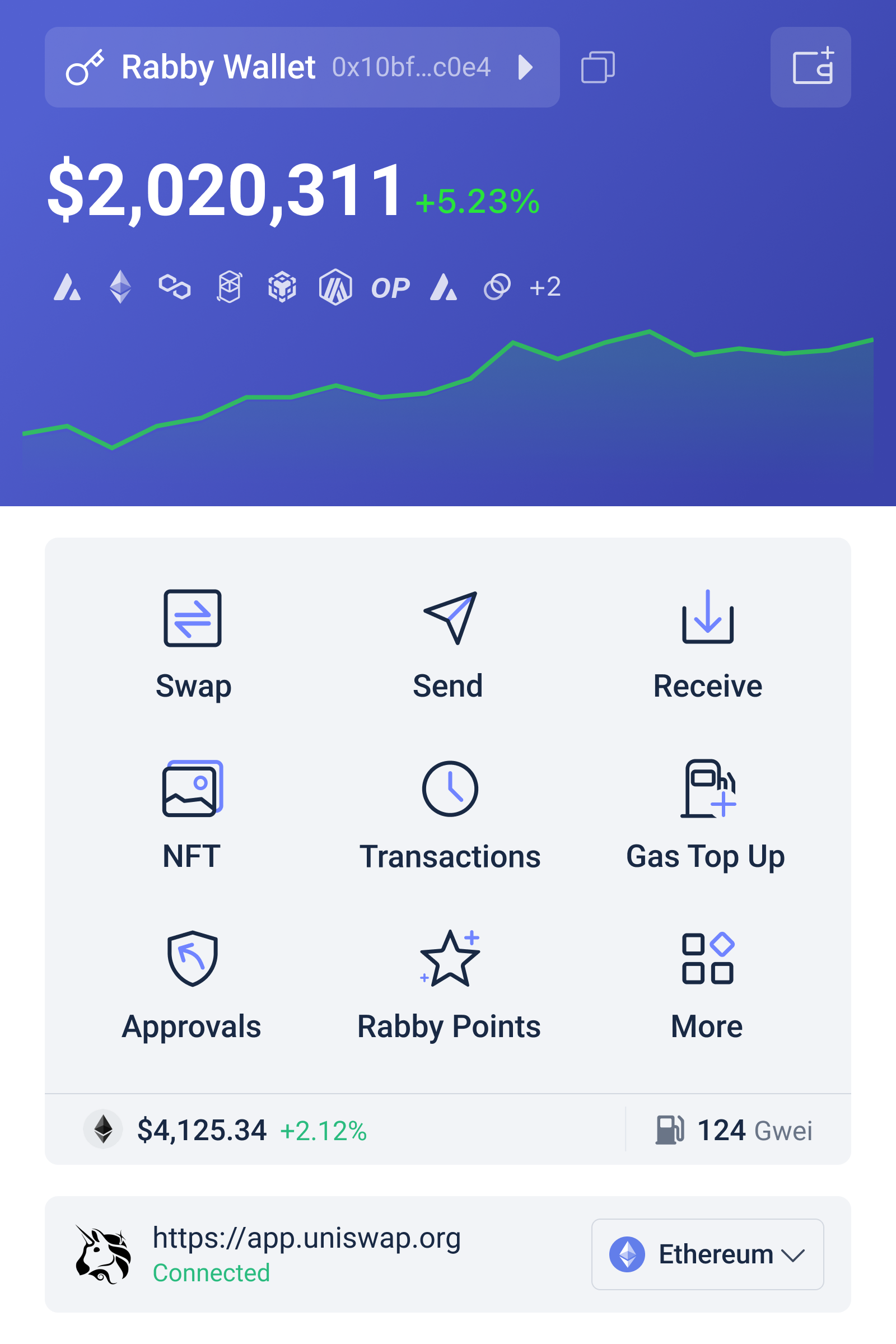
Rabby Wallet Oberfläche mit automatischem Netzwerk-Switching zwischen Ethereum, Linea und zkSync Era, zeigt Gas-Gebühren und Netzwerk-Indikatoren

Wie automatisches Netzwerk-Switching funktioniert und warum es wichtig ist

Automatisches Netzwerk-Switching bedeutet, dass Rabby Wallet die Blockchain-Anforderung einer dApp erkennt und das Wallet-Netzwerk automatisch anpasst, ohne den Nutzer zu unterbrechen. Wenn ein Nutzer beispielsweise eine Uniswap-Position auf zkSync Era einsehen möchte, erkennt das Wallet die Chain-ID des Smart Contracts und wechselt automatisch zum zkSync-Netzwerk. Das gleiche geschieht bei Linea-Operationen. Der Nutzer muss nicht manuell in die Wallet-Einstellungen gehen, das Netzwerk aus einer Liste auswählen und dann den korrekten RPC-Endpunkt bestätigen.

Das bedeutet nicht, dass das Wallet blind jeden Netzwerkwechsel durchführt. Rabby Wallet zeigt dem Nutzer deutlich an, welches Netzwerk aktiv ist, insbesondere wenn ein Smart-Contract-Aufruf eine andere Chain verlangt als die gerade aktive. Diese Transparenz ist entscheidend, weil Netzwerk-Verwechslungen zu kostspieligen Fehlern führen können. Wenn Wert auf dem falschen Netzwerk gesendet wird, ist eine Wiederherstellung oft unmöglich oder sehr aufwändig. Das Wallet-Design muss daher einen Kompromiss treffen: Automatisierung für häufig verwendete Übergänge, aber ausreichend Sichtbarkeit, damit der Nutzer nicht unbewusst Assets auf Linea bei einem Mainnet-Preis bewegt.

Die EVM-Kompatibilität ist der technische Grund, warum dieses automatische Switching überhaupt möglich ist. Ethereum, Linea, zkSync Era, Arbitrum, Polygon, BNB Chain, Avalanche, Optimism, Base und Fantom verwenden alle die Ethereum Virtual Machine oder eine kompatible Variante. Das bedeutet, dass Wallets, Smart Contracts und Transaktionen ähnliche Struktur aufweisen. Rabby Wallet kann daher ein einziges Adresse- und Schlüsselverwaltungssystem nutzen und nur die Netzwerk-Parameter (Chain-ID, RPC-URL, Blockexplorer) ändern. Das ist nicht völlig trivial, aber es ist deutlich einfacher als Wallets zu unterstützen, die auf völlig anderen Protokollen basieren.

Ein wichtiger Sicherheitsaspekt ist, dass private Schlüssel unabhängig vom Netzwerk bleiben. Der gleiche private Schlüssel signiert Transaktionen auf Ethereum, Linea, zkSync und anderen Chains. Das ist die Grundlage des Multi-Chain Wallet-Konzepts. Aber genau deshalb ist es kritisch, dass der Nutzer die aktuelle Chain immer kennt, bevor er signiert. Ein automatisches Netzwerk-Switching kann dies vereinfachen, aber es darf nicht zu “Blind Signing” führen, bei dem der Nutzer eine Transaktion genehmigt, ohne zu wissen, auf welcher Blockchain sie abläuft.

Linea und zkSync Era: Unterschiedliche Skalierungsansätze, ähnliche Wallet-Anforderungen

Linea ist ein Rollup der Ethereum Foundation, das Transaktionen off-chain verarbeitet und deren Gültigkeit-Beweis periodisch auf Ethereum veröffentlicht. zkSync Era ist ein Zero-Knowledge-Rollup, das ähnlich funktioniert, aber ZK-Proofs statt Fraud-Proofs für Sicherheit verwendet. Für einen Wallet-Nutzer sind diese Unterschiede abstrakt: Beide Netzwerke haben eigene RPC-Endpunkte, eigene Gebührenstrukturen und eigene Token-Ökosysteme.

Gas-Gebühren unterscheiden sich erheblich. Auf Ethereum Mainnet kann eine einfache ERC-20-Übertragung 20–50 Dollar kosten. Auf Linea oder zkSync Era sinkt die gleiche Transaktion auf 0,10–1 Dollar. Das macht den Wechsel zu Layer-2-Lösungen attraktiv, aber Rabby Wallet muss diese Kostenunterschiede transparent darstellen. Ein Nutzer, der eine DEX-Swap auf Linea durchführt, sollte sehen, dass die Gebühr um ein Vielfaches niedriger ist als auf Mainnet. Das wird jedoch nur möglich, wenn das Wallet beide Netzwerk-Parameter kennt und aktiv vergleichen kann.

Die Brücken-Architektur ist ein praktischer Unterschied, der das Wallet-Design beeinflusst. Nutzer müssen Assets von Ethereum zu Linea oder zkSync über offizielle Bridges bewegen. Rabby Wallet integriert diese Bridges nicht direkt, aber das automatische Netzwerk-Switching ermöglicht es, schnell zwischen dem Mainnet (wo Assets ankommen) und dem Layer-2-Netzwerk (wo der Handel stattfindet) zu wechseln. Ein Nutzer kann also Dai auf Ethereum empfangen, zum Linea-Netzwerk wechseln, die Bridge nutzen und dann sofort auf Linea handeln, ohne mehrfach ein Wallet neu zu konfigurieren.

Beide Netzwerke unterstützen das gleiche Wallet-Ökosystem: MetaMask, WalletConnect, Ledger und andere. Rabby Wallet positioniert sich hier als Alternative mit besserer Simulation und Sicherheit. Die Fähigkeit, Transaktionen vor dem Signieren zu simulieren—ein Rabby-Kernfeature—wird auf Layer 2 besonders wertvoll. Gas-Kosten sind niedrig genug, dass Nutzer experimentieren, aber automatische Netzwerk-Verwechslungen könnten trotzdem zu versehentlichen Approvals oder Token-Transfers auf der falschen Chain führen. Ein simuliertes Vorschaubild, das zeigt, welche Tokens eingehen und welche ausgehen, ist auf allen Blockchains nützlich, aber auf Linea und zkSync, wo Gebühren marginal sind, ist das Risiko eher informationell als finanziell.

Transaktions-Simulation als Schutz gegen vernetzte Fehler

Rabby Wallet zeigt vor dem Signieren an, welche genauen Tokenwerte übertragen werden, welche Risiken eine Transaktion birgt und welche Gebühren anfallen. Dieses Simulation-Feature ist nicht auf ein Netzwerk beschränkt. Es funktioniert auf Ethereum, Arbitrum, Polygon, zkSync und Linea mit der gleichen Logik. Der Nutzer sieht eine detaillierte Vorschau unabhängig davon, welches Netzwerk automatisch gewählt wurde.

Das ist besonders wichtig, wenn automatisches Netzwerk-Switching verwendet wird. Ein Nutzer könnte eine dApp nutzen, die auf Ethereum startet, dann automatisch zu Linea wechselt, und die Vorschau überprüfen, bevor er unterzeichnet. Wenn die Simulation einen unerwarteten Tokenaustritt zeigt—beispielsweise, dass mehr Wert abfließt als erwartet—kann der Nutzer die Transaktion stoppen. Ohne diese Simulation würde der automatische Netzwerkwechsel potentiell riskanter, weil die Fehlerrate steigt, wenn Nutzer weniger aktiv überwachen.

Die Simulation berücksichtigt auch Slippage bei DEX-Swaps. Wenn ein Nutzer auf Linea-basiertes Uniswap einen Token austauscht, zeigt Rabby, ob der erwartete Output realistisch ist. Eine zu hohe Slippage deutet auf geringe Liquidität oder ungültige Quotierung hin. Dies könnte bedeuten, dass der Preis zwischen der Anfrage und der Ausführung erheblich gestiegen ist oder dass ein Smart Contract falsch konfiguriert ist. Die Simulation warnt proaktiv, bevor der Nutzer Kapital riskiert.

Ein weiterer Sicherheitsaspekt ist die Erkennung malicious Smart Contracts. Rabby analysiert Transaktionen auf bekannte Angriffsmuster, beispielsweise Approvals für unbekannte Adressen oder unerwartete Token-Transfers. Layer 2 bietet keine Immunität gegen diese Risiken. Tatsächlich könnten geringere Gebühren dazu führen, dass Nutzer häufiger mit verschiedenen dApps experimentieren, was das Risiko potenziell erhöht. Rabby Wallet versucht, dies durch Warnung vor verdächtigen Mustern zu steuern, unabhängig vom Netzwerk.

Netzwerk-Verwechslungen vermeiden: Best Practices für Linea- und zkSync-Operationen

Automatisches Netzwerk-Switching ist komfortabel, erfordert aber Disziplin im Umgang damit. Der erste Schritt ist, die aktuelle Netzwerk-Anzeige des Wallets immer zu überprüfen, besonders nach automatischen Wechseln. Rabby Wallet zeigt das aktive Netzwerk prominent an—normalerweise oben in der Browser-Extension oder im Desktop-Interface. Bevor eine Transaktion signiert wird, sollte der Nutzer zwei Sekunden investieren, um zu bestätigen, dass das richtige Netzwerk aktiv ist.

Der zweite Schritt ist, die richtige Adresse für den Empfänger zu verwenden. Adressen in EVM-kompatiblen Blockchains folgen dem gleichen Format (0x…): eine Adresse auf Ethereum kann auf Linea oder zkSync eingegeben werden, und der Smart Contract würde sie akzeptieren. Das bedeutet aber nicht, dass Funds dort ankommen. Die Adresse muss dem Empfänger auf dem Ziel-Netzwerk gehören. Eine häufige Fehlerquelle ist, Ethereum-Adressen zu kopieren und auf Linea einzugeben, ohne dass der Empfänger dort ein entsprechendes Wallet hat. Rabby Wallet kann dies nicht automatisch erkennen, aber die Simulation zeigt zumindest, dass die Transaktion an eine externe Adresse geht.

Der dritte Schritt betrifft Bridge-Transaktionen. Wenn ein Nutzer Assets von Ethereum zu Linea überträgt, nutzt er eine offizielle Bridge wie Linea’s Portal oder eine Drittanbieter-Bridge. Diese sind nicht ins Wallet integriert, aber der Nutzer muss verstehen, dass die Bridge Wert auf dem Mainnet nimmt und ihn auf Layer 2 freisetzt. Während dieser Zeit sind die Funds “in Transit” und können weder auf Ethereum noch auf Linea bewegt werden. Die Wartezeit beträgt normalerweise 5 Minuten bis mehrere Stunden, abhängig von Congestion und Bridge-Implementierung.

Ein praktisches Vorgehen ist, zunächst einen kleinen Test-Transfer zu durchführen. Statt 10 ETH sofort zu bridgen, sendet der Nutzer 0,1 ETH, bestätigt, dass die Transaktion auf Linea ankommt und dort empfangen wird, und transferiert dann die restlichen Funds. Dies kostet minimal extra Gas (da Layer-2-Gebühren sehr niedrig sind), reduziert aber das Risiko eines Totalverlusts durch Bedienungsfehler.

Hardware Wallets und Rabby Wallet: Multi-Chain-Sicherheit für höhere Vermögenswerte

Rabby Wallet unterstützt Hardware Wallets wie Ledger und Trezor. Wenn ein Nutzer ein Hardware Wallet verbindet, muss er nicht den Private Key direkt im Browser speichern. Stattdessen signiert das Hardware Wallet jede Transaktion physisch, und der Computer kann die Signatur nicht fälschen. Dies ist besonders wichtig für Nutzer mit höheren Vermögenswerten oder längerfristigem Halten.

Das automatische Netzwerk-Switching funktioniert auch mit Hardware Wallets. Wenn das Wallet von Ethereum zu zkSync Era wechselt, muss der Nutzer die Transaktion auf dem Hardware-Gerät (normalerweise ein kleines Display mit Bestätigungsbutton) bestätigen. Das Hardware Wallet zeigt normalerweise die Chain-ID an, bevor es signiert. Ein kritischer Punkt: Der Nutzer muss auf dem Hardware-Gerät bestätigen, dass die richtige Chain-ID angezeigt wird, nicht nur dem Software-Wallet vertrauen, dass es automatisch das richtige Netzwerk gewählt hat.

Der Prozess wird etwas aufwändiger, aber die Sicherheit steigt erheblich. Ein Angreifer, der den Computer des Nutzers kompromittiert, kann nicht einfach Transaktionen signieren. Das Hardware Wallet bleibt offline und unter physischer Kontrolle. Kombiniert mit Rabby’s Transaktions-Simulation bietet dies mehrschichtige Sicherheit: Software-Simulation zeigt, was passiert, Hardware-Signatur bestätigt, dass die richtige Aktion autorisiert wird.

Gas-Optimierung und Gebührenvergleich über Netzwerke hinweg

Einer der Hauptgründe, auf Linea oder zkSync Era zu wechseln, ist die Gebührenersparnis. Ein einfacher Token-Swap auf Ethereum Mainnet kann 30–100 Dollar kosten, während der gleiche Swap auf zkSync vielleicht 0,30 Dollar kostet. Rabby Wallet zeigt die geschätzten Gas-Gebühren vor dem Signieren an, aber es vergleicht diese Gebühren nicht automatisch über Netzwerke hinweg.

Der Nutzer selbst muss entscheiden: Lohnt sich die Aktion auf diesem Netzwerk, oder sollte ich zu einem günstigeren Netzwerk wechseln? Wenn der Nutzer beispielsweise eine kleine Position schließen möchte, könnte die Ethereum-Gebühr für ihn unrentabel sein. Ein Wechsel zu zkSync oder Linea würde die Kosten um das 100-fache reduzieren. Rabby Wallet macht diesen Wechsel durch automatisches Netzwerk-Switching technisch einfacher, aber der Nutzer muss immer noch aktiv denken.

Eine praktische Strategie ist, kleinere Operationen auf Layer 2 durchzuführen und nur größere Konsolidierungen auf Mainnet. Wenn beispielsweise jemand während eines Monats mehrere Small-Positions auf Layer 2 aufbaut, kann er diese am Ende des Monats zu einer Asset klasse konsolidieren und dann einmal auf Ethereum bridgen. Das reduziert die Gesamtgebühren, erfordert aber Planung. Rabby Web3 Wallet unterstützt diesen Workflow durch automatisches Netzwerk-Switching und klare Gebührenanzeige, ohne die Nutzer zu zwingen, teuer auf Mainnet zu operieren.

NFT-Verwaltung und DeFi-Integration über Layer 2

Rabby Wallet zeigt auch NFTs (ERC-721 und ERC-1155) und DeFi-Positionen an. Ein Nutzer, der eine NFT auf zkSync gemünzt hat oder eine Lending-Position auf Linea hält, sieht diese im Wallet direkt. Das automatische Netzwerk-Switching ermöglicht es, nahtlos zwischen Ethereum-NFTs und Layer-2-NFTs zu wechseln.

NFT-Transfers sind komplizierter als Token-Transfers, weil jedes NFT einzigartig ist. Ein Nutzer kann sein NFT nicht einfach auf einen beliebigen Empfänger übertragen; die Adresse muss ein Wallet oder ein Smart Contract sein, der NFTs empfangen kann. Rabby Wallet warnt vor Smart Contracts, die NFTs nicht empfangen können. Aber auch hier gilt: Das automatische Netzwerk-Switching vereinfacht die Oberfläche, und die Simulation zeigt vor dem Signieren, welches NFT übertragen wird.

DeFi-Positionen sind ähnlich. Ein Nutzer könnte eine Lending-Position auf Aave haben, die auf Ethereum läuft, und eine andere auf Aave Linea. Rabby zeigt beide an und erlaubt es, automatisch zum Linea-Netzwerk zu wechseln, um diese Position zu überprüfen oder eine Transaktion zu signieren. Die Zinssätze und Risiken unterscheiden sich zwischen den Netzwerken—Ethereum hat mehr Liquidität, aber höhere Gebühren—und diese Unterschiede sollten der Nutzer bewusst sein.

Mobile und Desktop: Konsistenz bei automatischem Netzwerk-Switching

Rabby Wallet ist als Browser-Extension (Chrome, Brave, Edge), Desktop-App (Windows, macOS) und zukünftig als Mobile-App (iOS, Android in 2025–2026) verfügbar. Das automatische Netzwerk-Switching sollte auf allen Plattformen konsistent funktionieren, aber die technischen Bedingungen unterscheiden sich.

Im Browser ist das Netzwerk-Switching unmittelbar und abhängig von der dApp, die im gleichen Fenster lädt. Auf dem Desktop als eigenständige App muss das Wallet die aktive dApp über WalletConnect oder eine andere Verbindung erkennen. Auf Mobile wird dies noch komplizierter, weil Apps und Browser getrennt sind und die Integration von OS abhängt.

Die größere Sicherheitsverantwortung liegt auf dem Nutzer, unabhängig davon, welche Plattform verwendet wird. Private Keys sollten immer auf dem Gerät verschlüsselt bleiben. Rabby speichert Seed Phrases niemals auf externen Servern. Das Wallet bietet biometrische Locks (Fingerabdruck, Face ID), um zusätzliche Sicherheit auf dem gleichen Gerät hinzuzufügen. Automatisches Netzwerk-Switching sollte jedoch niemals dazu führen, dass ein Nutzer weniger aufmerksam ist.

Praktischer Workflow: Von Ethereum über Linea zu zkSync und zurück

Angenommen, ein Nutzer hat 5 ETH auf Ethereum Mainnet und möchte diese auf Linea bewegen, dort einen Swap durchführen und dann auf zkSync wechseln, um eine andere Transaktion durchzuführen. Ein detaillierter Workflow mit Rabby Wallet könnte so aussehen:

Schritt 1: Der Nutzer hat Rabby Wallet installiert und ein lokales Wallet erstellt oder ein existierendes Wallet importiert. Die Private Keys sind im Wallet gespeichert und verschlüsselt. Schritt 2: Er sendet 5 ETH von einer CEX oder einer anderen Quelle zu seiner Rabby-Adresse auf Ethereum Mainnet. Rabby zeigt das Mainnet automatisch an, die Adresse wird korrekt angezeigt. Schritt 3: Um zu Linea zu wechseln, nutzt der Nutzer die offizielle Linea Portal Bridge. Rabby’s automatisches Netzwerk-Switching erkennt, dass die Bridge ein Linea-Netzwerk erfordert und wechselt automatisch. Der Nutzer bestätigt das neue Netzwerk in der Wallet-Anzeige, bevor er die Bridge-Transaktion durchführt.

Schritt 4: Nach etwa 5 Minuten sind 5 Linea-ETH in seinem Wallet angekommen. Schritt 5: Der Nutzer öffnet eine dApp auf Linea (z. B. Uniswap Linea). Das Wallet erkennt die Chain-ID und wechselt automatisch zum Linea-Netzwerk. Schritt 6: Der Nutzer führt einen Token-Swap durch. Rabby simuliert die Transaktion und zeigt die genauen Output-Token, die Gebühr (etwa 0,15 Dollar auf Linea) und mögliche Risiken. Der Nutzer bestätigt. Schritt 7: Nach wenigen Sekunden ist die Transaktion abgeschlossen. Der Nutzer hat neue Tokens auf Linea.

Schritt 8: Jetzt möchte er zu zkSync Era wechseln und eine ähnliche Operation durchführen. Der Nutzer müsste seine neuen Tokens über eine Bridge (Stargate, Relay oder andere) von Linea zu zkSync transferieren. Während dieser Bridge-Transaktion bleibt Rabby auf Linea. Schritt 9: Nach Bestätigung der Bridge-Transaktion nutzt der Nutzer Rabby’s automatisches Netzwerk-Switching, um zu zkSync Era zu wechseln. Schritt 10: Auf zkSync führt er eine Transaktion durch, simuliert diese erneut, und bestätigt. Dieser gesamte Workflow wäre ohne automatisches Netzwerk-Switching deutlich aufwändiger, würde mehrfaches manuelles Konfigurieren von Netzwerkparametern erfordern und hätte ein höheres Fehlerrisiko.

Häufig gestellte Fragen

Wechselt Rabby Wallet automatisch zum Linea- oder zkSync-Netzwerk, wenn ich eine dApp öffne?

Ja, Rabby Wallet erkennt die Chain-ID der dApp und wechselt automatisch zum erforderlichen Netzwerk. Bevor eine Transaktion signiert wird, zeigt das Wallet das aktive Netzwerk deutlich an. Der Nutzer sollte immer bestätigen, dass das richtige Netzwerk aktiv ist, besonders bei automatischen Wechseln, um Verwechslungen zu vermeiden.

Kann ich meine privaten Schlüssel versehentlich auf das falsche Netzwerk offenlegen, wenn automatisches Netzwerk-Switching verwendet wird?

Nein, private Schlüssel bleiben immer lokal verschlüsselt, unabhängig vom Netzwerk. Der Schlüssel selbst wird nicht übertragen oder offengelegt. Allerdings könnten Transaktionen auf das falsche Netzwerk signiert werden, wenn der Nutzer nicht bestätigt, welches Netzwerk aktiv ist. Rabby’s Transaktions-Simulation hilft, solche Fehler zu vermeiden, indem sie vor dem Signieren zeigt, was genau passiert.

Wie unterscheiden sich Gebühren auf Ethereum, Linea und zkSync Era, und wie helfen sie mir Rabby Wallet dabei?

Ethereum Mainnet kostet durchschnittlich 20–100 Dollar pro Transaktion, Linea etwa 0,10–1 Dollar, zkSync Era ähnlich. Rabby zeigt die geschätzten Gebühren vor dem Signieren an, vergleicht diese aber nicht automatisch über Netzwerke. Der Nutzer muss entscheiden, welches Netzwerk kosteneffizient ist. Für kleinere Operationen sind Layer 2 deutlich rentabler.

Categories
Uncategorized

The Institutional Bridge Trade-Off: Why Cross-Chain Access Is a Market-Structure Problem

A cross-chain bridge can move an asset in seconds and still leave a trader with more risk than before. That counterintuitive fact is central to understanding institutional crypto infrastructure: speed and convenience measure only the visible part of a transaction. Beneath them sit custody assumptions, validator incentives, liquidity conditions, settlement finality, and the possibility that a token on one network is not the same claim as the “same” token on another.

For US traders using a wallet alongside a centralized exchange, the practical question is therefore not simply, “Can this bridge transfer my assets?” It is, “What new dependency am I accepting in exchange for access to another market?” This distinction separates institutional-grade analysis from product browsing. A wallet connected to an exchange such as okx may make movement between trading and Web3 environments more convenient, but convenience does not remove the need to understand the bridge’s mechanism.

OKX logo representing the connection between centralized exchange access and self-custodied Web3 activity

Myth One: A bridged asset is automatically the original asset

The most common misunderstanding is linguistic. Traders say they are moving bitcoin, ether, or a stablecoin from one chain to another, but the technical process may not be a simple relocation. In a lock-and-mint design, an asset is held on the source network while a representation is created on the destination network. In a burn-and-mint design, the original representation may be destroyed on one chain and recreated on another. Other systems use liquidity pools, where a user receives a corresponding asset from reserves rather than a newly issued representation.

These models create different obligations. A locked asset depends on the security of the contract or custodian holding it. A minted representation depends on the system that verifies deposits and authorizes issuance. A liquidity-based bridge depends on available reserves and the incentives that keep those reserves balanced. The ticker may look familiar, but the economic claim has changed.

This is why the useful unit of analysis is not merely the token symbol. It is the token plus its chain, issuer or bridge mechanism, redemption route, liquidity, and settlement assumptions. A US dollar stablecoin held on a major centralized venue, a native version issued on a particular network, and a bridged version in a decentralized application can share a name while carrying materially different operational risks.

Myth Two: More chains automatically mean more diversification

Access to multiple networks can broaden a trader’s opportunity set. Different chains may host different applications, fee structures, trading pairs, and liquidity pockets. Yet multi-chain access can also multiply correlated failure points. A user may now depend on a bridge, a destination-chain application, a wallet approval, a liquidity pool, and a centralized exchange withdrawal process. Diversification of venues is not the same as diversification of infrastructure risk.

The distinction matters during market stress. When prices move sharply, bridge demand can rise at the same moment that liquidity becomes thinner and transaction fees become less predictable. Slippage—the difference between the expected execution price and the actual price—can expand. A transaction that looked inexpensive in calm conditions may become costly when many users attempt the same exit.

Institutional desks generally treat this as a routing and exposure problem rather than a feature checklist. They ask where liquidity is deepest, how quickly a transfer can be final, what happens if the destination chain is congested, and whether the asset can be returned through an equally reliable path. Retail traders can apply the same logic without building an institutional operations team: identify the complete route, not just the button labeled “Bridge.”

Myth Three: A fast bridge is necessarily a safer bridge

Speed usually comes from reducing waiting time somewhere in the process. That may mean relying on a smaller validator set, accepting optimistic assumptions before final verification, using an intermediary liquidity provider, or allowing a message to be acted upon before every underlying event is considered irreversible. Faster settlement can be valuable, but it is not a synonym for stronger security.

Finality is the key concept. In this context, finality means the degree of confidence that a transaction cannot be reversed or invalidated by the source network or by the bridge’s verification system. Different chains and bridge designs reach that confidence differently. A displayed “success” message may indicate that a transaction was accepted by an interface, while the economically meaningful question is whether the transfer is final enough for the user’s intended action.

This creates a real trade-off. A cautious system may require more confirmations and therefore take longer. A faster system may improve capital efficiency but expose users to greater dependence on relayers, validators, oracle systems, or emergency controls. Neither design is universally superior. The appropriate choice depends on transaction size, urgency, liquidity, and the cost of being wrong.

What institutional market analysis actually measures

Institutional features are often described as dashboards, APIs, portfolio views, and execution tools. Those features matter, but the deeper institutional standard is repeatability. Can an organization explain who controls each step, reconcile balances across venues, set approval limits, and recover from an interrupted transfer? A polished interface is useful only if the underlying process remains legible under pressure.

For cross-chain activity, a practical analysis can be organized around five questions:

  • Representation: Is the destination asset native, wrapped, minted, or supplied from a liquidity pool?
  • Verification: Who or what confirms that the source-side event occurred?
  • Liquidity: Can the asset be traded or redeemed at the required size without excessive slippage?
  • Recovery: What happens if the destination chain pauses, the bridge is delayed, or a transaction is sent to the wrong network?
  • Operational control: Can approvals, addresses, and transfer limits be reviewed before funds move?

These questions reveal a non-obvious point: bridge risk is partly a market risk and partly an operations risk. A trader can be directionally correct about an asset and still lose money through an incorrect network selection, an excessive token approval, a thin liquidity pool, or an inability to exit the chosen route. In other words, execution quality includes the path by which an asset reaches the market.

The centralized-exchange connection changes the decision

A wallet integrated with a centralized exchange can reduce friction between custody environments. That may help a trader move from exchange-based execution to on-chain applications, monitor balances, or use assets across different networks. But integration also makes boundaries easier to overlook. The exchange account, the wallet, the bridge, and the decentralized application may each apply different security assumptions and fee schedules.

For a US user, regulatory and availability considerations add another layer. Products, tokens, and services may not be offered on identical terms in every jurisdiction, and access can depend on account status, asset support, or changing platform policies. A trader should verify the supported network and asset at the moment of transfer rather than infer compatibility from a familiar ticker or logo.

The safest workflow is deliberately boring. Start with a small test amount. Confirm the receiving address and network. Check whether the asset is native or bridged. Review token approvals and revoke unnecessary permissions when appropriate. Keep enough native gas currency on the destination chain for the intended transaction. Then compare the total cost—including bridge fees, exchange fees, network fees, spread, and potential slippage—with the value of the opportunity.

What to watch next in cross-chain infrastructure

The near-term direction of the market will likely depend less on the number of supported chains than on how clearly systems expose their assumptions. Better interfaces may show provenance, confirmation status, liquidity depth, route alternatives, and the difference between quoted and guaranteed execution. That would be more meaningful progress than simply adding another network to a dropdown menu.

A plausible institutional scenario is that cross-chain tools become more selective rather than universally seamless. Large or time-sensitive transfers may favor slower routes with stronger verification, while smaller trades may use faster liquidity-based systems when the expected benefit outweighs the added risk. The signal to monitor is not marketing language about interoperability; it is whether users can understand and control the dependencies involved.

For traders, the durable lesson is simple: treat a bridge as a financial intermediary with its own balance sheet, verification model, and failure modes—even when no traditional bank appears in the transaction. A wallet and exchange connection can improve access, but informed access requires a map of the route. The best institutional feature is not frictionless movement at any cost. It is the ability to see where the risk moved when the asset did.

Frequently Asked Questions

Is a cross-chain bridge the same as a blockchain transfer?

No. A standard transfer usually moves an asset within one network. A bridge coordinates value or a representation across separate networks, often using locking, minting, burning, messaging, or liquidity pools. The security and redemption assumptions therefore depend on the bridge design.

What should a trader check before bridging funds?

Check the destination network, the exact asset representation, total fees, available liquidity, confirmation requirements, and the route for returning the funds. Use a small test transaction when the route is unfamiliar, and ensure the destination wallet holds enough native currency to pay for subsequent transactions.

Does exchange integration eliminate bridge risk?

No. Integration can simplify account and wallet workflows, but it does not change the bridge’s verification model, liquidity conditions, or destination-chain risks. It improves usability; it does not guarantee settlement, redemption, or profit.

Categories
Uncategorized

Trezor Suite for Bitcoin Cash, Dogecoin, and Fork Coin Management: Why Some Legacy Coins Have Limited Suite Integration

A user holds Bitcoin Cash acquired years ago, a modest stack of Dogecoin from earlier enthusiasm, and some Litecoin Cash that came through a fork. The obvious instinct is to manage everything through Trezor Suite, the official application designed for Trezor hardware wallets. Yet when the user opens the portfolio view, they find that Bitcoin Cash appears with limited functionality—no stake rewards, no direct swap interface, no integrated buy option. Dogecoin is present but similarly constrained. The question becomes practical: should these coins be moved to another wallet, managed through a workaround, or left inactive until support expands?

This scenario reveals an important distinction between what Trezor hardware wallets can technically support and what Trezor Suite, the non-custodial application layer, prioritizes for integration. The hardware itself can sign transactions for thousands of cryptocurrencies. The Suite, however, is a curated interface that reflects business decisions, user demand, and development resources. Some coins receive full treatment with buy, sell, swap, and staking functions. Others appear in portfolio view with basic send and receive capability. A few popular assets lack meaningful presence altogether. Understanding this gap is essential for users managing legacy coins, fork-derived assets, or less mainstream cryptocurrencies while maintaining the security model that makes a hardware wallet valuable in the first place.

Trezor Suite interface showing portfolio view with varying levels of asset integration and functionality across supported cryptocurrencies

The architecture of Trezor Suite versus hardware capability

Trezor hardware wallets contain the cryptographic machinery needed to manage dozens of coin types. The device can generate extended keys, derive child addresses, sign transactions, and enforce confirmation dialogs—all without exposing private keys to a connected computer. This isolation is the core security property. A compromised computer cannot extract the seed phrase or forge a transaction signature. From a technical perspective, adding a new cryptocurrency to a Trezor device requires only the addition of protocol parameters: the network ID, fee structure, address format, and transaction serialization rules.

Trezor Suite is not the hardware wallet itself but rather the official software layer—the application available for download on Windows, macOS, Linux, Android, and iOS—that presents the wallet’s capabilities to the user. Suite decides which coins to display, how much functionality to expose, and which ancillary services to integrate. Bitcoin, Ethereum, Litecoin, Cardano, and Solana receive extensive feature integration because they represent the largest value, most active development, and clearest user demand. The application provides real-time price monitoring, built-in buy and sell through integrated providers, native swap routing, and staking participation for eligible assets.

Bitcoin Cash, Dogecoin, and similar coins occupy a middle category. The supported cryptocurrencies list includes them, the hardware wallet can sign their transactions, and Suite displays balances and supports sending. What is missing is the service layer infrastructure: no integrated exchange provider offers Bitcoin Cash buy or sell, no market maker routes BCH swaps through Suite’s interface, and no staking programs integrate directly. These coins are not unsupported; they are minimally integrated. The distinction is material because it affects how a user interacts with the asset and whether remaining in Suite versus moving to a secondary tool makes sense.

Why Bitcoin Cash and similar coins receive limited Suite integration

The decision to prioritize certain coins over others follows a clear pattern: market capitalization, trading volume, active user base, and ecosystem maturity. Bitcoin Cash, despite its historical significance as a fork of Bitcoin and its continued presence on major exchanges, has a much smaller user base within the Trezor ecosystem than Bitcoin itself. Dogecoin, originating as a joke coin but now holding substantial market value, similarly attracts fewer active Trezor users than Ethereum or Solana. Service integration—the ability to buy, sell, or swap directly through Suite—depends on relationships with market makers and exchange providers, which naturally prioritize assets with consistent trading demand.

Development resources also matter. A cryptocurrency exchange provider evaluating integration must consider API complexity, fee splits, regulatory requirements, and customer acquisition. Bitcoin is the obvious choice. Ethereum is essential because of its massive token ecosystem and DeFi activity. Newer layer-2 chains or high-demand assets justify integration because they attract users specifically seeking that functionality. Bitcoin Cash and Dogecoin are legitimate cryptocurrencies with real utility and market activity, but they may not trigger the threshold of demand needed to justify dedicated engineering and provider relationships.

The model also reflects long-term business incentives. Trezor’s primary revenue comes from hardware sales and premium features such as advanced account management. The suite application is provided free to drive hardware adoption and lock users into the ecosystem. For that strategy to work, the core experience must be excellent and must serve the majority of users well. Edge cases and minority coins receive less priority because optimizing for them would stretch resources from higher-impact improvements.

This creates an implicit hierarchy: tier-one assets (Bitcoin, Ethereum) have complete integration; tier-two coins (Litecoin, Cardano, Solana) have substantial functionality with some gaps; tier-three assets (Bitcoin Cash, Dogecoin) have portfolio tracking and basic transaction support; and unlisted coins must be managed through external tools. The honest framing is not that Suite does not support these coins but that support is asymmetrical across features.

Managing Bitcoin Cash on a Trezor device without Suite integration

A user holding Bitcoin Cash has several options, each with different security and convenience trade-offs. The first is to continue using Suite for receive addresses and balance tracking while accepting that buy, sell, and swap functions are unavailable. Since Suite correctly displays BCH balances and allows sending to any address, a user can manually initiate trades elsewhere. This is workable for infrequent transactions but becomes tedious for active trading or frequent rebalancing.

The second option is to use a non-Suite wallet that supports Bitcoin Cash while retaining the Trezor device as the signing authority. Applications such as Electron Cash or similar Bitcoin Cash–specific wallets can interface with a connected Trezor device, allowing the user to manage addresses and sign transactions on the hardware wallet while using a third-party interface for trading, fee control, or other features. This approach preserves the core security model—the private key never leaves the device, and every transaction requires physical confirmation—while extending functionality.

The practical process involves importing the Trezor’s extended public key into Electron Cash or another compatible wallet, which generates addresses identical to those used by Suite. The user can then receive Bitcoin Cash through either application because both derive the same addresses from the same hardware seed. Sending requires connecting the Trezor device to the third-party wallet and confirming the transaction on the device itself, just as in Suite. The advantage is access to better fee control, address coin management, and potentially third-party exchange integrations.

However, this introduces a coordination burden. The user must track whether a coin is being managed through Suite, Electron Cash, or another tool. Different applications may display slightly different balance information if they synchronize at different times. Most importantly, the recovery process becomes more complex. If the Trezor device is lost, the user will restore it using the recovery seed and can regenerate all addresses from Suite or any compatible wallet. The key principle remains unchanged: all signing happens on the device, and the private keys never touch a computer.

Dogecoin, fork coins, and the challenge of community-driven assets

Dogecoin presents a different challenge than Bitcoin Cash because its development has been less formally organized and its integration into exchange infrastructure less universal. While Dogecoin is actively traded and has a substantial following, its presence in professional trading venues is smaller than Bitcoin’s or Ethereum’s. Few market makers route Dogecoin swaps through decentralized aggregators, and fewer still have developed integration partnerships with hardware wallet providers.

Fork-derived coins such as Litecoin Cash, Bitcoin Gold, or other offshoots from major blockchains occupy an even more constrained position. These coins often inherit the technical properties of their parent—Litecoin Cash uses similar script and signature mechanisms to Litecoin—but lack the liquidity, merchant adoption, and user concentration that would justify service integration. A Trezor device can generate valid Litecoin Cash addresses and sign transactions for them. Suite may or may not display them by default. If a user wishes to manage these coins actively, the third-party wallet route becomes necessary.

The security model remains intact regardless of which software interface is used. The hardware wallet’s design ensures that signing authority stays on the device. Whether the interface is Suite, a community-maintained wallet, or a self-hosted blockchain node accessing the Trezor through standard protocols, the principle is identical: the computer or phone is never trusted with the ability to authorize transactions. This is why a sophisticated user can confidently manage coins with limited Suite support—they are not compromising the security advantage that a hardware wallet provides.

The tension between comprehensive support and realistic prioritization

The ideal scenario would be complete, unified management of every supported coin through a single, fully-featured interface. Users could manage Bitcoin, Dogecoin, Litecoin Cash, and dozens of other assets with identical ease, swapping between them with identical functionality, and staking wherever available. This is not the reality, and the constraint is not technical incompetence or oversight—it is resource allocation.

Building service integration requires more than cryptocurrency protocol knowledge. It requires partnerships with exchange providers, market maker connections, API development, fee negotiation, regulatory assessment, and customer support. A development team must choose: spend engineering effort on broad, shallow support for hundreds of coins, or deep, rich support for the coins that drive the most user value and transaction volume? The answer from established wallet providers has consistently been the latter.

This creates a secondary ecosystem. Independent developers have built wallets, bridge tools, and utilities to extend Trezor’s capabilities. The Trezor Model One, Model T, Model T Pro, and other hardware versions continue to work perfectly with these community and third-party tools because the hardware implements only the cryptographic core, not the full application logic. A user can access Trezor device availability here for official software, and can also evaluate compatible community wallets for specific coin support.

The user experience is less seamless than a fully integrated solution, but the security posture remains superior to managing private keys in a software wallet on a desktop or mobile device. The trade-off is between convenience and sovereignty: retaining absolute control of signing authority in exchange for slightly more manual coordination across tools.

Practical steps for a Bitcoin wallet user managing legacy coins

A user holding a Bitcoin wallet alongside Bitcoin Cash, Dogecoin, or other coins can adopt a tiered management strategy. Tier one consists of coins with full Suite integration—Bitcoin, Ethereum, Litecoin, and others that offer buy, sell, swap, and staking. These should be managed exclusively through Suite for consistency and to maximize functionality. Tier two comprises supported but minimally integrated coins such as Bitcoin Cash and Dogecoin. These should be managed through Suite for basic operations but may benefit from external tools for trading or advanced fee control. Tier three includes fork coins or niche assets that may not appear in Suite’s default view but are still accessible through compatible wallets using the Trezor device.

For tier-two and tier-three coins, the starting point is always the recovery seed stored safely offline. The seed allows restoration from any compatible wallet, so users are never locked into a single interface. When connecting a Trezor device to a third-party application such as Electron Cash for Bitcoin Cash management, the user should verify that the first derived address matches what Suite displays. This simple check confirms that the external wallet is correctly reading the seed and generating valid addresses. Only after confirming address continuity should actual transactions be conducted.

Fee management deserves particular attention. Suite provides a simplified fee interface suitable for most users, but coins with less active Suite integration may benefit from access to more granular fee control available in specialized wallets. For assets with volatile demand or specific transaction timing, the ability to set precise satoshis-per-byte or gwei rates can make a material difference in cost. The tradeoff is that this requires deeper technical understanding, so it is most appropriate for users actively trading or managing substantial balances.

Security implications of multi-wallet management

The security advantage of a hardware wallet—that private keys never touch an internet-connected device—is preserved across any compatible software interface. Whether using Suite, Electron Cash, or another tool, the workflow is identical: the software prepares a transaction, displays it for review, passes it to the Trezor device, receives the signed transaction, and broadcasts it to the network. The key never leaves the device at any step.

Where users introduce risk is through inconsistent backup practices, poor seed storage, or confusion about which coins are held in which wallet. If a user restores a Trezor seed into both Suite and a third-party application, both are generating addresses from the same seed and can see the same transactions. There is no duplication of funds or loss of security. However, if the user forgets which external wallet they used to check a Bitcoin Cash balance, or if they restore the seed into a counterfeit or malicious application, the risk profile changes. The hardware wallet’s isolation from the private key remains absolute, but the overall security outcome depends on the full system—seed storage, device firmware, software source authenticity, and recovery procedures.

This is why verifying application source is crucial. Downloading Suite or compatible wallets from official sources, checking cryptographic signatures when available, and understanding the difference between open-source projects with community review and unknown applications is not optional. A compromised or malicious interface cannot steal private keys, but it could present false addresses, broadcast incorrect transactions, or socially engineer a user into dangerous practices.

The future of Trezor Suite coverage and ecosystem strategy

The expectation that Suite will eventually support every asset with full functionality is probably unrealistic. Market forces will continue to drive prioritization toward the coins with the largest user bases, highest volume, and clearest service provider integration. However, the Trezor hardware platform’s openness to third-party applications means that gaps in Suite functionality do not prevent users from managing lesser-supported coins securely.

What could improve the experience is better documentation. Users managing Bitcoin Cash, Dogecoin, or fork coins through external wallets would benefit from clear, official guidance on which third-party tools have been reviewed for compatibility, how to verify address derivation, and what to watch for in terms of fee calculations or transaction confirmation times. Trezor provides some of this guidance, but a dedicated resource for managing non-custodial wallet in a multi-tool environment would reduce confusion and potentially improve security by making correct practices more discoverable.

The core insight is that limited Suite integration does not mean limited asset security. A non-custodial wallet design ensures that whether the interface is official or third-party, the private key remains on the hardware. Users managing legacy coins, fork assets, or less mainstream cryptocurrencies are not forced into a choice between Suite convenience and hardware wallet security. They can have security by design and simply accept a slightly less streamlined user experience. That is an acceptable trade-off for maintaining sovereign control over cryptocurrency that may be worth significant value over years or decades.

Frequently asked questions

Can I manage Bitcoin Cash on a Trezor device if Trezor Suite does not offer full integration?

Yes. Trezor Suite displays Bitcoin Cash balances and supports sending, which covers the most common workflows. For trading, swapping, or advanced fee control, you can use a compatible third-party wallet such as Electron Cash while keeping the Trezor device as the transaction signer. Your private keys remain on the hardware regardless of which interface you use, as long as the wallet is from a trusted source and correctly derives addresses from your Trezor seed.

Why does Trezor Suite prioritize Bitcoin and Ethereum but offer limited support for Dogecoin?

Service integration—buy, sell, swap, and staking functions—depends on partnerships with market makers and exchange providers who prioritize coins with high trading volume and user demand. Bitcoin and Ethereum attract massive user bases and consistent trading activity, justifying these integrations. Dogecoin and similar coins have real value and user bases, but fewer service providers have developed integrations with hardware wallet software. Development resources are allocated toward the highest-impact improvements.

If I manage coins through multiple wallets connected to my Trezor, do I compromise security?

No, provided each wallet application is from a trusted source. The security model of a hardware wallet depends on the device signing transactions, never exposing the private key. Whether the interface is Trezor Suite, Electron Cash, or another compatible tool, the signing happens on the hardware and the private key remains isolated. The risk comes from using counterfeit applications or poor seed storage practices, not from using multiple legitimate interfaces for the same seed.

Categories
Uncategorized

Guarda Wallet Biometric Security on Mobile: Fingerprint and Face ID Explained

A mobile cryptocurrency user faces a practical security dilemma. Hardware wallets offer isolation but require physical devices and cable connections. Software wallets on phones are convenient but store sensitive cryptographic material on devices that receive calls, texts, and app notifications constantly. The middle ground—biometric authentication layered over local encryption—promises to reduce the friction of typed passwords without moving private keys to cloud servers or external hardware. But biometric systems are often misunderstood. A fingerprint sensor or face camera is not a substitute for proper key storage; it is a gating mechanism that sits in front of it.

Guarda Wallet’s mobile application demonstrates how this architecture works in practice. The wallet supports biometric unlock on both iOS and Android, using device-level cryptographic facilities—Apple’s Secure Enclave on iPhones and Google’s Titan M2 security coprocessor on eligible Android devices—to authenticate users before private keys can be accessed. That integration matters because it means biometric data never leaves the device and private keys never exist outside encrypted storage. But the security provided by that system depends on understanding what each layer actually protects and where the boundaries lie. A compromised device, a stolen unlock method, or a misplaced recovery phrase can defeat even a well-designed authentication flow.

Mobile biometric authentication interface showing fingerprint and face recognition options integrated with encrypted key storage on iOS and Android devices

How biometric systems guard encrypted keys without replacing them

Biometric authentication in a mobile wallet works as a two-stage lock. The first stage is the biometric sensor—fingerprint reader or face camera—which captures a biological sample. The second stage is the local encryption key that actually protects the private cryptocurrency keys. These are not the same thing, and conflating them is the source of much confusion about biometric security.

When a user registers a fingerprint or face on an iPhone or Android device, the sensor captures a mathematical representation of the biometric data. That representation is stored in a hardware-backed secure enclave or security coprocessor, isolated from the main operating system. It never leaves the device, and the operating system cannot access it directly. When the user later attempts to unlock the Guarda Wallet, the phone’s biometric system performs a local comparison between the current scan and the stored representation. If they match above a threshold, the secure hardware unlocks a cryptographic key that is also held in the enclave.

That key then becomes available for a limited time to decrypt the actual private cryptocurrency keys, which remain encrypted at rest on the device’s main storage. The biometric does not encrypt the keys itself; rather, it gates access to the encryption key that does. This distinction is crucial because it means the strength of the wallet’s security depends on both the biometric authentication and the underlying encryption. A biometric system with a 1 in 50,000 false acceptance rate is still only as strong as the encryption it protects, which in the case of properly implemented AES-256 is far stronger than any biometric.

The practical implication is that biometric unlock provides convenience without reducing cryptographic security below the level established by the password or recovery phrase. If a recovery phrase is properly generated, stored offline, and never exposed, then biometric unlock does not weaken that baseline. It simply replaces the friction of typing a complex password with a faster local check. Conversely, if the recovery phrase has been shared, photographed, or stored in an unencrypted cloud backup, biometric unlock cannot fix that vulnerability.

Fingerprint authentication: capillary patterns and false acceptance rates

Fingerprint biometrics work by analyzing ridge patterns, which include loops, whorls, and arches, plus minutiae points where ridges end or split. Modern fingerprint sensors use capacitive, optical, or ultrasonic imaging to capture these patterns at sufficient resolution to support reliable authentication. On Android devices, the Titan M2 security processor holds the fingerprint enrollment and comparison logic, preventing the main processor from ever seeing the raw biometric data.

The false acceptance rate (FAR) is a critical metric for understanding fingerprint reliability. A FAR of 1 in 50,000 means that a random person’s fingerprint has roughly a 1-in-50,000 probability of being accepted by the system as a match to an enrolled fingerprint. For a device that belongs to only one user, this is quite low. Over a year of daily use, the probability of a random acceptance is approximately 7 percent. For a wallet that may contain substantial funds, this is not negligible, which is why device-level password protection and recovery phrase security remain essential.

Fingerprint sensors are also vulnerable to physical capture. A high-resolution photograph of a finger, or a lifted latent fingerprint from a surface, can potentially be reproduced as a fake print. This attack is more sophisticated than casual theft—it requires deliberate effort and equipment—but it is possible. A phone left unattended or stolen can be attacked through fingerprint spoofing more easily than it can be attacked through face authentication. The second line of defense is therefore the encryption key that biometric unlocking gates. If the device is stolen or compromised, the attacker still needs to either extract the key from secure hardware (a difficult task) or crack the encryption protecting the private keys.

Face recognition: liveness detection and the limits of facial geometry

Face authentication systems on modern iPhones use Apple’s Face ID technology, which combines structured light depth sensing, machine learning, and liveness detection to verify that a real person is presenting their face—not a photograph, mask, or video. The system projects an infrared dot pattern and measures how the face reflects those dots in three dimensions. It then compares this 3D map to enrolled facial geometry.

Face ID has a substantially lower false acceptance rate than fingerprint systems—approximately 1 in 1,000,000 for the general population. However, Face ID is also more vulnerable to targeted attacks. A well-made silicone mask, especially if paired with printed eye details or contact lenses, has been demonstrated to defeat Face ID in laboratory conditions. The system resists casual spoofing through liveness checks (detecting that a flat image is not a real face), but a high-quality fake face is more difficult to distinguish.

On Android, face authentication options vary by manufacturer. Some devices use 2D facial recognition, which is substantially weaker than Apple’s 3D system and can be defeated by photographs more easily. Other devices use 3D depth sensing similar to Face ID. When evaluating an Android device for cryptocurrency storage, the specific face authentication technology matters significantly. The face unlock feature should be documented in the device specifications; if it is 2D only, adding a second biometric factor (such as fingerprint) is advisable for cryptocurrency applications.

Face recognition is also affected by changes in appearance—growing or shaving facial hair, wearing glasses, or changes in lighting can affect recognition reliability. This is usually a minor inconvenience for day-to-day unlocking, but it means that face authentication alone is somewhat less reliable than fingerprint over a multi-year period if the user’s appearance changes substantially. For cryptocurrency wallets, which users access infrequently, this is less of an issue than for devices that are unlocked dozens of times per day.

Local encryption and the role of the secure enclave

The security of biometric authentication in a mobile wallet ultimately rests on the quality of the encryption protecting the private keys. Apple’s Secure Enclave and Google’s Titan M2 are hardware security modules integrated into modern processors. They are isolated from the main CPU and run their own operating system, making it extraordinarily difficult for malware or even a compromised kernel to access the cryptographic keys they protect.

When Guarda Wallet stores a private key on an iOS device, the encryption key is typically derived from a combination of factors: a user-provided password, the device’s unique hardware identifier, and sometimes additional entropy. The encrypted key material is stored on the device’s main storage, but the decryption key itself is generated in the Secure Enclave and never transmitted to main memory except under tightly controlled conditions. Biometric authentication does not replace this encryption; instead, it provides a convenient way to unlock the decryption key without requiring the user to type a long password.

On Android, the Titan M2 processor performs a similar role, though the implementation details vary by manufacturer and Android version. Devices certified for Android biometric standards must meet specific security requirements: biometric data must be processed in a trusted execution environment, biometric templates must never leave the secure hardware, and authentication decisions must be made within the secure hardware rather than in the main operating system.

The implication is that a modern smartphone with a working secure enclave or equivalent hardware provides a substantially stronger foundation for cryptocurrency key storage than older devices or devices without hardware-backed security. If a device does not have a secure enclave, biometric data is processed in software, which is easier to compromise. Similarly, older devices without hardware backing should not be considered equally secure for cryptocurrency purposes, regardless of whether they support biometric unlock.

Common misconceptions about biometric cryptocurrency security

One widespread misunderstanding is that biometric authentication is equivalent to hardware wallet security. It is not. A hardware wallet is a purpose-built device with minimal software, no wireless connectivity, and cryptographic operations that are designed to be immune to side-channel attacks. A biometric-protected phone is more convenient but inherently less isolated. The phone runs a complex operating system, connects to the internet constantly, receives untrusted content, and can be attacked through dozens of vectors that do not exist for a hardware wallet.

A second misconception is that biometric authentication eliminates the need for a recovery phrase. This is false. A recovery phrase is essential because it provides recovery if the device is lost, stolen, or broken. If a user has not written down their recovery phrase and stored it safely offline, biometric authentication becomes a liability rather than an asset: the user is locked out permanently if the phone is destroyed, and an attacker who steals the phone has only the biometric and encryption barriers between them and the funds. A recovery phrase is therefore not an optional security measure; it is a requirement for responsible self-custody.

A third misconception is that biometric security is weaker than password security because fingerprints and faces cannot be changed. While it is true that biometrics are fixed, a properly implemented biometric system on modern hardware does not depend on biometric strength alone. The biometric gates access to an encryption key, which is cryptographically strong and hardware-protected. If an attacker defeats the biometric, they still must crack or extract the encryption key, which is a fundamentally different (and much harder) problem. The security is additive, not a replacement.

A fourth misconception is that biometric systems are essentially perfect for unlocking, when in reality all biometric systems have false acceptance and false rejection rates. False acceptance means an unauthorized person is sometimes accepted; false rejection means an authorized person is sometimes denied. The trade-off between these rates can be adjusted in software, but it cannot be eliminated. For a cryptocurrency wallet, understanding that biometric unlock is convenient but not infallible is important. Users should be prepared for occasional lockouts and should always have a backup method (password or recovery phrase) available.

Device compromise and the limits of biometric protection

A critical limitation of biometric security is that it protects against casual access but not against sophisticated device compromise. If malware gains root or kernel access on a phone, it may be able to hook the unlock system, intercept the decryption key, or monitor operations performed after unlock. The secure enclave provides strong isolation, but the operating system itself is not always trustworthy, especially if the device has not received security updates, is running a modified or rooted version, or is infected with sophisticated spyware.

This is why keeping a device updated is crucial for cryptocurrency storage. Operating system security updates patch vulnerabilities that could allow attackers to bypass or exploit biometric systems. A device running an outdated iOS or Android version is substantially less secure than an updated device, regardless of biometric features. For users storing substantial amounts of cryptocurrency on mobile, regular updates should be non-negotiable.

Physical device access also presents risks that biometric authentication cannot fully address. If a device is stolen by someone with expertise in hardware attacks, they may be able to extract the secure enclave or Titan M2 and attack it outside the device using specialized equipment. This is a very difficult attack and requires significant resources, but it is not impossible. For this reason, users storing large amounts should consider using hardware wallets for long-term storage and keeping only spending amounts on mobile devices.

Another risk is that the recovery phrase becomes the critical fallback. If a device is permanently disabled, lost, or stolen, the recovery phrase is the only way to access funds. If the recovery phrase has been stored carelessly—written in a notes app, photographed and stored in cloud backup, or shared with anyone—then biometric security on the phone is irrelevant. The recovery phrase is the strongest link in the security chain, not the weakest.

Setting up biometric authentication securely in Guarda and other mobile wallets

When first installing a mobile cryptocurrency wallet, users should follow a deliberate sequence rather than rushing through setup. The first step is to generate the wallet and write down the recovery phrase in a secure offline format—on paper, not on another digital device. This should be done before enabling biometric or password authentication. The recovery phrase should be stored in a location with physical security, such as a safe, or distributed across multiple trusted locations where no single person can reconstruct it.

The second step is to create a strong password. Even though biometric unlock will be used for daily access, a password is necessary as a recovery mechanism if biometric data becomes unreliable. The password should be at least 12 characters and should not be stored in a password manager that could be compromised. It is reasonable to write a strong password on the same paper as the recovery phrase, as long as that paper is secured offline.

The third step is to enable biometric authentication. At this point, the recovery phrase and password are already secured, so biometric unlock is purely a convenience mechanism. Instructions for enabling biometric authentication vary slightly between iOS and Android and between different versions of Guarda Wallet, but the general principle is that the wallet will present an option to enable Face ID, fingerprint, or both. Users should enable both if the device supports both, as this provides redundancy—if one biometric fails or becomes unreliable, the other can be used.

The fourth step is to test the setup. Users should perform a few test transactions and verify that biometric unlock works consistently. They should also test the password recovery path by using the password to unlock instead of biometric, confirming that the password works. This is important because if the biometric system fails in the future, the password must be reliable. Finally, users should verify that they can recover the wallet using the recovery phrase by importing it into a different application in this guide. This is the ultimate test that the recovery path works and that funds can be recovered if the device is lost.

Comparing biometric security across devices and platforms

The actual security provided by biometric authentication varies significantly based on the hardware and software of the device. An iPhone with a Secure Enclave and Face ID provides substantially stronger biometric security than an older Android device with 2D facial recognition. Similarly, a modern Android device with a Titan M2 processor and ultrasonic fingerprint sensing provides better security than a device with older capacitive sensors.

For users choosing a device specifically for cryptocurrency storage, the security features should be evaluated explicitly. Key factors include whether the device has a hardware security module (Secure Enclave, Titan M2, or equivalent), whether it receives regular security updates for at least 3 to 5 years, whether it supports both fingerprint and face biometrics, and whether the operating system is recent and well-maintained. A flagship device from the current year is a better choice than a budget device or a device several years old, even if the budget device has biometric features.

Users already holding a device should work with what they have rather than upgrading solely for biometric security. Adding biometric unlock to an existing device is more secure than using passwords alone, regardless of whether the device is cutting-edge. The security improvement is real even on devices with less sophisticated hardware. However, for a device that is already several years old and no longer receives security updates, consider whether long-term cryptocurrency storage on that device is advisable. The lack of security updates introduces risks that biometric authentication cannot mitigate.

Web and extension-based wallets, by contrast, do not have access to device biometrics in most cases. A browser extension version of Guarda Wallet running on a desktop will rely on password protection and local encryption rather than biometric unlock. This is not inherently less secure, as desktop operating systems can use their own encryption and authentication mechanisms, but it does mean that biometric convenience is not available on all platforms. Users should understand that mobile devices provide a specific security advantage through hardware-backed biometrics, making them suitable for smaller amounts of frequently accessed funds, while desktop and hardware wallets provide different trade-offs for other use cases.

The real question: security as a system, not a feature

Biometric authentication is a genuine improvement in mobile cryptocurrency security, but it is not a complete solution. Its value is in reducing the friction of security without reducing the cryptographic strength. A system that integrates biometric unlock with local encryption, secure hardware, device updates, a secured recovery phrase, and careful operating practices is substantially more secure than one that relies on passwords alone or that neglects recovery phrase security.

Users evaluating secure crypto storage should therefore think of biometric authentication as one layer in a multi-layered security system. The layers include the strength of the device’s hardware security features, the quality of the local encryption, the security of the operating system and its updates, the physical security of the device, the management of the recovery phrase, the strength of the password, the user’s operational security practices, and the decisions about how much cryptocurrency to keep on the mobile device versus on hardware or in other storage.

The presence of biometric features is a reason to choose a modern mobile device for cryptocurrency storage, but not the only reason and not a substitute for the other layers. A user with excellent recovery phrase security, strong passwords, regular device updates, and careful access habits is more secure than a user who relies entirely on biometric unlock while storing the recovery phrase in a cloud backup or writing it in a digital note. Security is the product of systems, not features. Biometric authentication makes the system more convenient; diligence makes it actually secure.

Frequently asked questions

Is biometric authentication as secure as a hardware wallet?

No. A hardware wallet is a dedicated device with minimal software and no wireless connectivity, making it more resistant to malware and remote attacks. A biometric-protected phone is more convenient but runs a complex operating system with internet connectivity, creating a larger attack surface. Biometric unlock on a phone is substantially more secure than password-only protection, but it does not provide the same isolation as a hardware wallet. For large amounts of cryptocurrency, hardware wallets remain the strongest option.

What happens if I lose my phone or biometric stops working?

Your recovery phrase is the only way to regain access to your funds. This is why storing your recovery phrase securely offline, separate from your phone, is essential. If you lose your device, you can import the recovery phrase into Guarda Wallet on another device and restore your wallet. If your biometric stops working, you can unlock using your password. Always test your recovery phrase on a different device before you need it.

Can someone unlock my wallet using my fingerprint without my knowledge?

Modern biometric systems on iPhones and Android devices have false acceptance rates of around 1 in 50,000 (fingerprint) to 1 in 1,000,000 (Face ID), meaning random acceptance is very unlikely. However, a sophisticated attacker with physical access to your device could potentially spoof your fingerprint or use specialized attacks. The second layer of protection is the encryption key that biometric unlock gates. Even if biometric authentication is defeated, the attacker still must extract or crack the encrypted private keys, which is much more difficult. This is why keeping your device updated and your recovery phrase secure is critical.

Categories
Uncategorized

Ledger Live Download for Enterprise: Bulk Deployment, MDM Integration, and IT Compliance

Organizations holding cryptocurrency for operational reserves, treasury management, or custodial services face a specific problem: how to deploy secure wallet management across multiple employee devices without sacrificing individual key isolation or audit visibility. A single hardware wallet works for one person; scaling to teams requires standardized configuration, centralized monitoring, and the ability to enforce security policies across devices that may be owned by the organization or brought by employees. Ledger Live—the companion application for Ledger hardware devices—offers a structured approach to this challenge, but deployment at scale demands more than point-and-click installation.

The distinction between consumer use and enterprise deployment is not merely one of volume. Enterprise cryptocurrency management requires documented installation workflows, mobile device management integration, compliance logging, role-based access controls, and recovery procedures that can be audited by internal teams or external regulators. An IT administrator tasked with rolling out secure wallet capability across a 50-person operations team cannot rely on individual employees downloading and configuring applications independently. Instead, the organization needs a repeatable process that combines hardware provisioning, software distribution, configuration management, and ongoing compliance verification.

Enterprise deployment workflow showing MDM-managed devices connected to centralized Ledger Live administration console with audit logging and compliance reporting

Understanding the enterprise architecture of Ledger Live deployment

Ledger Live functions as a bridge between hardware devices and blockchain networks. The actual private keys remain isolated on the Ledger hardware wallet—they never leave the secure element, even if the connected computer is compromised. This architectural separation is the foundation of security, but enterprise deployment must extend that principle to the entire software ecosystem. The application layer includes account viewing, transaction signing, and DApp interaction, while the hardware layer provides cryptographic isolation and physical key storage. Between them sits the operating system and device configuration, both critical touchpoints for enterprise control.

When an organization decides to support cryptocurrency self-custody, it must first clarify the asset scope, transaction authority, and compliance requirements. Will all employees have equal access to all wallets, or will certain individuals hold recovery phrases for specific accounts? Will transactions require multi-signature approval, and if so, how will that workflow integrate with existing authorization systems? These questions shape how the Ledger Live download process is packaged, where applications are staged, and which endpoints have access to configuration files or audit logs.

The technical foundation for enterprise Ledger Live download deployment begins with understanding device categories. IOS and Android devices managed by a mobile device management solution represent one category; company-issued laptops or desktops under endpoint management represent another. Each category has different constraints regarding where software can be sourced, how configuration is enforced, and whether compliance plugins or logging agents can be installed. A retail bank’s operations team might deploy Ledger Live exclusively on hardened workstations in a dedicated room; a financial services firm might distribute it across employee laptops with specific security policies enforced by MDM.

Mobile device management integration for centralized control

Mobile device management platforms—such as Microsoft Intune, VMware Workspace ONE, MobileIron, or Apple’s Device Enrollment Program—provide the infrastructure for centralized software distribution, configuration management, and compliance monitoring. When ledger live download is integrated into an MDM platform, the installation can be pushed automatically to enrolled devices, with standardized configuration applied without requiring manual setup on each device. This reduces user error, accelerates deployment, and ensures consistency across the organization.

For iOS environments, Apple’s App Store supports MDM distribution through volume purchase programs or managed app configurations. An IT administrator can define allowed apps, restrict app stores or third-party app sources, and enforce minimum version requirements. When a new version of Ledger Live becomes available, the MDM system can be configured to deploy it automatically or notify administrators for staged rollout. Device encryption, passcode requirements, and restrictions on device jailbreaking are enforced at the operating system level, creating a foundation that the application can rely upon.

Android deployment follows a similar pattern through managed Google Play or alternative enterprise app stores. Organizations can sideload Ledger Live from verified repositories, enforce app signing verification, and restrict installation sources to prevent inadvertent use of modified or malicious versions. MDM policies can restrict USB debugging, disable developer options, and enforce storage encryption on managed Android devices. Critically, the MDM system should be configured to track which version of Ledger Live is installed on which device, flag outdated installations, and enable automatic updates where the organization’s change management process permits.

The configuration payload delivered through MDM should include settings such as default language, network connectivity preferences, and whether to enable specific features. Some organizations may want to restrict DApp interaction to a whitelist of known addresses, disable peer-to-peer transaction features, or require all transactions to be logged for compliance review. The ledger live download configuration file—typically delivered as JSON or a managed configuration schema—should be version-controlled and documented like any other infrastructure code.

Staged deployment and version control for enterprise risk management

Enterprise software deployment is rarely a big-bang cutover. A responsible IT organization begins with a pilot group of power users, validates functionality in a test environment, monitors for unexpected behavior, and only then rolls out to broader populations. This principle applies directly to Ledger Live download staging. An organization might first deploy to a five-person treasury team with direct oversight, observe their workflows for two weeks, document edge cases and integration points, then expand to finance operations staff, and finally to nodes in other departments if cryptocurrency custody is distributed.

Version management becomes critical because Ledger frequently releases updates that address security vulnerabilities, add asset support, or improve user interface elements. An enterprise must decide: Do we adopt every security patch immediately, or do we follow a scheduled update window? The answer depends on the organization’s risk tolerance and operational cadence. A cryptocurrency trading desk might require near-immediate patching of security issues. A long-term treasury reserve function might accept a 30-day patch window if testing and change approval are required. What is non-negotiable is that all deployed versions are tracked, and there is a documented process for identifying unsupported or abandoned versions.

Testing should include not only the Ledger Live application itself but also integration with the hardware wallets in use, the blockchains and tokens the organization plans to manage, and any third-party integrations such as accounting systems or compliance platforms. If the organization uses a specific hardware wallet model or firmware version, testing should verify that the deployed Ledger Live version is compatible. Test scenarios should include account recovery from seed phrases, transaction signing workflows, device replacement procedures, and failure recovery when a device is lost or compromised.

Audit logging, compliance reporting, and regulatory documentation

One of the most significant gaps between consumer and enterprise deployment is audit visibility. An individual using Ledger Live on a personal device creates no compliance record. An organization managing cryptocurrency through shared or delegated wallets must maintain detailed logs of who accessed which accounts, what transactions were initiated, who approved them, and when they were executed. This information must be retained for regulatory review, internal audit, and forensic investigation if transactions are disputed.

Ledger Live itself provides transaction history and account balance information within the application, but this is typically insufficient for enterprise compliance. Most organizations will need to integrate Ledger Live data with a separate audit logging system, either through manual export and archival or through API integration if available. The exported records should include account identifiers, transaction hashes, timestamp, initiator, approver, destination address, amount, and status. Logs should be immutable once committed—achieved through write-once storage, cryptographic hashing, or integration with a blockchain-based audit trail.

Regulatory requirements vary by jurisdiction and the organization’s role in the cryptocurrency ecosystem. A custodian holding client assets must comply with frameworks such as NYDFS BitLicenses or EU MiCA, which mandate specific record-keeping, risk management, and operational resilience requirements. A corporation holding crypto reserves for corporate treasury purposes faces different obligations, often set by the SEC, FINRA, or the organization’s own audit committee. An IT administrator deploying ledger live download should work with compliance and legal teams to understand these obligations before the system goes live, rather than retrofitting compliance after deployment.

Documentation should include the security architecture, the list of who has access to which wallets, the change management process for software updates, the procedure for device replacement or decommissioning, the backup and recovery process for recovery phrases, and incident response procedures if a device is lost or compromised. This documentation is not paperwork—it is the foundation of regulatory confidence and internal accountability. If an auditor or regulator questions the organization’s control over its cryptocurrency, the documentation is the first line of defense.

Hardware device provisioning and recovery phrase management

Before Ledger Live can be deployed, the organization must decide how Ledger hardware devices themselves are acquired, initialized, and distributed. A critical decision is whether recovery phrases are generated by employees on their personal devices, generated once in a secure room and then distributed to individual wallets, or held centrally and used only when needed. Each approach has different security and operational consequences.

If employees generate their own recovery phrases, they retain complete control over account recovery, but the organization has no ability to recover accounts if an employee leaves, dies, or loses their device. If recovery phrases are generated once in a secure offline environment and then delivered to employees in sealed form, the organization can recover accounts, but there is a period of time when the seed phrase exists on hardware other than the individual’s Ledger device. If recovery phrases are held centrally by the organization, account recovery is straightforward, but employee turnover requires phrase rotation to prevent departed employees from accessing accounts.

A common enterprise practice is to generate recovery phrases in a secure, air-gapped environment; split them using Shamir’s Secret Sharing so that no single person holds a complete phrase; distribute the shares to designated keyholders; and document the recovery procedure for emergency use. This provides organizational resilience while reducing single points of failure. Ledger devices themselves should be physically inventoried, labeled with serial numbers, and tracked in an asset management system. When devices are decommissioned, they should be sanitized according to the organization’s data destruction policies—typically involving factory reset and physical destruction if the device stored sensitive material.

When an employee receives a Ledger device preloaded with a generated recovery phrase, the initial setup should be observed or verified by a second person to ensure the seed phrase is correctly written down and stored. The employee should then be instructed to change the device PIN before use. From that point forward, the PIN becomes the only access control that the employee holds—the recovery phrase is locked away, and day-to-day transactions require entering the PIN on the hardware device itself.

Integration with existing enterprise systems and operational workflows

Cryptocurrency management does not exist in isolation within an organization. Treasury teams need to integrate cryptocurrency holdings into cash management reporting. Accounting teams need to record transactions in the general ledger and track gains or losses for tax purposes. Risk management teams need visibility into counterparty exposure and market volatility. An effective Ledger Live download deployment includes planning for how data from Ledger Live flows into these existing systems.

Some organizations export transaction history manually and import it into accounting software; others invest in middleware or API integrations that pull balances and transaction data automatically. The choice depends on transaction volume, the level of automation acceptable to the organization, and the capabilities of the downstream systems. A high-transaction-volume organization might use an API to feed real-time data to a data warehouse for compliance and reporting. A low-volume organization might use monthly exports and manual reconciliation.

Operational workflows also require design. Who can initiate a cryptocurrency transaction, and who must approve it? Should transactions above a certain amount require multi-signature authorization from multiple Ledger devices? If an employee initiates a transaction but the approver is unavailable, how long can it remain in pending status? These questions should be answered before deployment so that the operational procedures can be documented and training can be provided. Unlike traditional banking systems where approval workflows are often embedded in the software, Ledger Live typically requires these workflows to be managed outside the application—through email approval, a separate ticketing system, or documented procedures.

Security hardening and threat model considerations

The security of Ledger Live deployment depends not only on the application itself but on the entire device and network environment in which it runs. An organization should conduct a threat model exercise that considers: What would an attacker need to do to steal funds or forge unauthorized transactions? What are the most likely attack vectors? Which controls can reduce the likelihood or impact of each attack?

Common threat vectors include: malware on the device that attempts to intercept transactions before they reach the hardware device; network-level attacks that intercept communication between the computer and the Ledger device; social engineering that tricks users into approving unauthorized transactions; loss or theft of the hardware device; and compromise of the recovery phrase. Mitigations include: endpoint protection and regular patching to reduce malware risk; USB security monitoring to verify legitimate Ledger device connections; user training and transaction verification procedures; encrypted storage of recovery phrases; and use of multi-signature authorization to require multiple Ledger devices for high-value transactions.

When deploying Ledger Live download, organizations should also consider network architecture. Should devices connect directly to the internet, or should they route through a VPN or corporate proxy? Should certain transaction destinations be restricted by firewall rules? If the organization uses a hardware security module or key management service for other cryptographic operations, should cryptocurrency signing be integrated with that system for consistency? These questions do not have universal answers—they depend on the organization’s risk profile, regulatory environment, and existing security infrastructure.

Frequently asked questions

Where should we source our Ledger Live download for enterprise deployment?

Ledger Live should be obtained from official sources: the Apple App Store or Google Play for mobile devices, or from Ledger’s official website for desktop applications. Organizations should verify the application signature, enable automatic updates through MDM where feasible, and document which version is deployed on each device. Never deploy applications from unofficial app stores or third-party repositories unless they have been explicitly verified by security and compliance teams.

Can we enforce specific transaction limits or approval workflows through Ledger Live?

Ledger Live itself does not provide built-in transaction limits or multi-step approval workflows. These controls must be implemented through operational procedures, separate ticketing or approval systems, or custom middleware that intercepts transactions before they are signed. Many organizations combine Ledger Live with institutional custody platforms or treasury management software that provides the required approval and authorization layers.

What happens when we need to update Ledger Live across hundreds of devices?

MDM platforms automate software updates by pushing new versions to enrolled devices on a schedule you define. Before deploying updates organization-wide, test the new version in a pilot group to verify compatibility with your hardware wallets, blockchains, and integrations. Document the update process, maintain version inventory, and have a rollback procedure if issues are discovered. Security patches should be prioritized for faster deployment; feature updates can follow your normal change management cadence.

Categories
Uncategorized

Phantom Wallet vs OKX Wallet: DeFi Power User Comparison for Advanced Traders on Multiple Chains

An advanced trader managing positions across Solana, Ethereum, Polygon, and Bitcoin faces a practical problem: most wallets optimize for either simplicity or a single ecosystem. Phantom began as a Solana-native wallet but has expanded to support multiple blockchains, placing it in direct competition with OKX Wallet, which launched with multi-chain ambitions from inception. Both claim to serve DeFi participants, but they differ substantially in swap routing architecture, portfolio depth, protocol integrations, and how they handle cross-chain activity. For a user executing frequent trades, managing complex positions, and requiring granular control over transaction execution, these differences translate into real costs and friction.

The distinction matters because neither wallet is a generic “hold and view” application. Both integrate with decentralized exchanges, liquidity protocols, and lending platforms. Both display token prices, NFT galleries, and transaction history. What separates them is what happens when a power user needs to swap a large position, track yield farming activity across multiple protocols, or route capital through less obvious market paths. One wallet may offer superior routing logic while another provides clearer transaction previews or deeper integration with specific DeFi applications. Understanding those trade-offs requires examining architecture, not just feature lists.

Side-by-side interface comparison showing Phantom Wallet and OKX Wallet transaction preview and swap routing screens

Multi-chain support: breadth versus depth

Phantom supports Solana, Ethereum, Polygon, Base, Bitcoin, Sui, and several other networks through its browser extension and mobile applications. That breadth reflects the wallet’s evolution from Solana focus toward a broader multi-chain architecture. However, breadth does not guarantee depth. Phantom’s support for Bitcoin, for instance, does not include advanced UTXO management, coin control, or privacy-oriented tools. Users sending Bitcoin from Phantom cannot select specific outputs or employ sophisticated fee optimization beyond a simple “fast/standard/slow” selector. For a trader routinely moving Bitcoin between markets, that limitation is material.

OKX Wallet, by contrast, was designed with multi-chain support as a foundational principle rather than a retrofit. It supports roughly forty networks including Ethereum, Arbitrum, Optimism, Base, Polygon, Solana, Bitcoin, Avalanche, and numerous Layer 2 and sidechains. The wallet does not, however, support custom network configuration, which means users cannot add emerging or private chains even with valid RPC endpoints. Both wallets share that constraint, reflecting a security trade-off: supporting arbitrary chains increases exposure to misconfigured networks and potential signature attacks.

The practical consequence is that for a trader using primarily established networks, OKX Wallet offers broader selection at the cost of greater installation size and complexity. Phantom remains leaner, but a user wanting to trade on Arbitrum or Optimism must either accept routing through a less familiar interface or use a second wallet. Neither wallet defaults to displaying gas prices across all chains simultaneously, so a user comparing cost efficiency across networks must track that information separately. The power user typically resolves this by connecting to a portfolio tracking service or comparing chains explicitly during trade planning.

Swap routing and liquidity aggregation

Swapping tokens within a wallet requires routing logic: the application must identify liquidity sources, calculate the most efficient path, and present a quote that reflects current market conditions. Phantom’s swap feature uses aggregated routing through Orca, Marinade, Magic Eden, and other protocols, with execution handled through the Phantom DeFi wallet integration layer. For Solana tokens, the routing is mature because Phantom’s historical focus has produced deep integrations. Cross-chain swaps are more limited; moving a token from Ethereum to Solana through Phantom involves significantly fewer route options than moving between Ethereum and Polygon.

OKX Wallet uses DEX aggregation across major exchanges on each supported chain, including Uniswap V3 on Ethereum, Curve, Balancer, and network-specific AMMs. The routing algorithm evaluates multiple paths simultaneously and typically presents three to five quoted routes with different slippage and execution characteristics. Importantly, OKX Wallet displays the routing breakdown: which DEX or protocol each segment of the trade uses, the fee tiers involved, and the expected slippage. Phantom provides less granular routing visibility; users see a final quote but not always the intermediate steps.

For large orders, that visibility gap matters. A trader moving a significant portion of an altcoin position needs to understand whether the quoted rate reflects execution through a single concentrated liquidity pool or whether routing distributes the order across multiple sources. OKX Wallet’s explicit breakdown allows a user to verify whether the route avoids a pool known to have wide spreads or whether it unnecessarily crosses multiple protocols. Phantom’s simpler presentation reduces information overload for casual users but forces power users to infer routing quality from the final quote alone.

Bridge routing for cross-chain swaps represents another divergence. OKX Wallet integrates with multiple cross-chain protocols and can compare bridge costs and speed. Phantom supports cross-chain movement through established bridges but does not offer aggregated comparison. A user needing to move assets from Polygon to Solana must either use a manual bridge or rely on Phantom’s limited cross-chain swap options. For frequent cross-chain traders, this is a measurable disadvantage relative to OKX Wallet’s broader routing capabilities.

Transaction simulation and safety features

Phantom includes a transaction simulation feature that analyzes whether a proposed action will succeed before broadcasting. When a user approves a swap, token approval, or protocol interaction, Phantom runs the transaction through a simulation service to predict outcomes. If the simulation indicates that the transaction would revert—due to insufficient liquidity, slippage exceeding tolerance, or a protocol issue—Phantom warns the user before funds are committed. This is a valuable safety mechanism because a failed transaction still consumes gas without changing balances.

OKX Wallet provides similar simulation capabilities on Ethereum and several other networks, but coverage is uneven. On chains with less mature node infrastructure or fewer block explorers, simulation may be unavailable or unreliable. Phantom’s simulation is more consistently available across supported chains because Solana’s architecture and Phantom’s long history with the ecosystem have enabled reliable integration. However, neither wallet simulates the second-order effects of a swap if executed during volatile market conditions or if your transaction is delayed in the mempool.

Scam detection and signature warnings represent a second safety layer. Both wallets flag suspicious contracts, unusual token approvals, and transactions that attempt to drain existing allowances. Phantom’s scam detection is powered by integration with security firms and community reporting. OKX Wallet uses similar heuristics. The key distinction is that both wallets warn against but do not prevent a user from approving an obviously malicious contract. A user who understands what they are signing can override the warning, which is necessary for legitimate but unusual operations. The protection is therefore a speed bump, not an absolute barrier.

Portfolio tracking and position management

Phantom displays token balances, recent transaction history, and basic portfolio metrics including total value and 24-hour price changes. The wallet does not provide advanced analytics: there is no built-in tax reporting, yield tracking, or protocol-specific position summarization. A user farming yield on Lido, Aave, or Raydium must track rewards and position values externally or through a specialized analytics platform. This limitation becomes acute when managing multiple positions across several chains and protocols.

OKX Wallet offers marginally more portfolio context. It displays recent transactions and balances more cleanly and integrates with OKX’s backend for price data consistency. However, it similarly lacks automated yield tracking or tax-report generation. Both wallets leave sophisticated portfolio management to external services. A power user typically supplements either wallet with a platform such as Zapper, DeBank, or Zerion to understand complex positions, track yield, and calculate tax liabilities.

The difference emerges in how each wallet presents transaction history. Phantom’s transaction display includes on-chain interaction type (swap, transfer, contract interaction) with reasonable clarity. OKX Wallet presents similar information but with a slightly more detailed breakdown of token flows within a single transaction. For a user who relies on wallet history to audit their own activity or reconcile positions, OKX Wallet’s additional clarity is incrementally useful. Neither wallet, however, provides the automatic categorization that specialized portfolio trackers do, so a user managing dozens of positions will need external tools regardless of wallet choice.

DeFi protocol integrations and native connections

Phantom maintains native integrations with Solana-based DeFi protocols including Marinade (staking), Raydium (swaps and liquidity provision), Magic Eden (NFTs), and others. These integrations allow users to interact with protocols through dedicated screens within the wallet rather than visiting external websites. For Solana users, this reduces friction: a trader can stake SOL, swap tokens, or browse NFTs without leaving the wallet interface. On other chains, Phantom does not offer equivalent native protocol integrations; users must connect to external sites through WalletConnect.

OKX Wallet similarly provides native integrations with popular protocols on major chains. On Ethereum, users can access Uniswap and Aave directly through the wallet. On other chains, integration depth varies. The more significant distinction is that OKX Wallet does not prioritize specific protocols in the same way Phantom does for Solana. A user cannot assume that any given DeFi application has a dedicated OKX Wallet integration; connecting through WalletConnect is the standard path.

This matters less than it appears because WalletConnect is mature and reliable. A trader using a protocol not specially integrated into their wallet of choice can still connect, approve transactions, and interact normally. The integration primarily reduces steps: instead of opening a browser tab, navigating to the protocol, and clicking “Connect Wallet,” the user taps a protocol card within the wallet. For routine operations, this saves seconds. For someone executing a complex series of swaps or yield farming operations during volatile conditions, every small improvement to speed and interface consistency matters.

Token approvals and allowance management deserve explicit mention here. Both wallets allow users to review and revoke token approvals, which is essential for risk management. If a user has approved a large allowance to a DEX or protocol and later suspects compromise or wants to eliminate exposure, they can approve a zero-value transaction to revoke the allowance. Neither wallet automates this process or warns preemptively that an allowance is unusually large. A power user typically manages approvals explicitly, granting only the allowance needed for the current transaction.

Gas optimization and fee management

Phantom’s fee controls vary by chain. On Solana, the wallet sets fees automatically with minimal user intervention because Solana’s fixed-fee model leaves little room for optimization. On Ethereum and Polygon, Phantom offers “fast,” “standard,” and “slow” gas options that map to percentile-based fee suggestions. Users cannot enter a custom gas price, which limits optimization during periods of acute congestion or when the user has specific timing preferences. A trader wanting to bid slightly below the “standard” rate to save costs cannot do so through Phantom’s interface.

OKX Wallet provides similar gas-selection options on Ethereum and other chains, with an additional “custom” mode that allows direct entry of gas price and gas limit. This is a meaningful advantage for power users. During congestion, a trader can lower gas price slightly below Phantom’s “slow” option to optimize cost. During low-congestion periods, they can be more aggressive with a “fast” price without overpaying unnecessarily. The custom option also helps when executing priority transactions: a user can set gas price precisely to land in the next block without excessive overpayment.

For Layer 2 networks such as Polygon and Base, gas costs are low enough that fee optimization is less critical. A few dollars in difference is immaterial relative to transaction value. On Ethereum mainnet, especially during sustained high activity, fee selection becomes more consequential. A trader executing a hedging position or rebalancing a large yield farm wants precise control over execution cost. OKX Wallet’s custom gas option is therefore more valuable for Ethereum power users; Phantom’s preset options are adequate for most scenarios but occasionally inefficient.

Mobile performance and extension stability

Phantom is available on iOS and Android as a native mobile application. The mobile version provides the core wallet functionality: viewing balances, sending and receiving tokens, approving transactions, and viewing transaction history. It does not offer desktop-equivalent swap routing; mobile swaps use simplified aggregation and do not display the multi-route comparison available on the extension. NFT functionality is present but scaled for smaller screens. A user managing complex positions from a phone will find the experience functional but constrained.

OKX Wallet offers iOS and Android applications with feature parity closer to the desktop version. Swap routing, multi-chain navigation, and NFT browsing are mobile-optimized but retain more depth than Phantom’s mobile interface. OKX Wallet’s mobile design makes trading on secondary chains more practical because the full routing logic is available. However, the added complexity can make the mobile app slower and battery-intensive relative to Phantom’s leaner mobile wallet.

Browser extension stability is a practical consideration for power users who keep the wallet open throughout the day. Phantom’s extension has historically been stable, particularly on Chrome and Brave. On Firefox, occasional synchronization issues have been reported, though these are rare. OKX Wallet’s extension is similarly stable on major browsers. Both wallets can occasionally require re-locking and re-unlocking if the browser is inactive for extended periods, which is a security feature but can create friction during long trading sessions.

The Phantom DeFi wallet integration and extension design prioritize responsiveness when interacting with Solana protocols. Users heavily focused on other chains may find OKX Wallet’s more balanced multi-chain design less jarring. Conversely, Solana traders will notice that Phantom is optimized for their specific use case, with faster page loads and smoother interactions within Solana DeFi. The choice therefore depends partly on whether your trading is concentrated in one ecosystem or distributed across multiple chains.

Practical decision framework for power users

A trader deciding between Phantom and OKX Wallet should answer three specific questions. First, what is your primary trading ecosystem? If Solana dominates your activity, Phantom’s optimizations and deep protocol integrations make it the natural choice. If you trade equally across Ethereum, Arbitrum, Optimism, and Polygon, OKX Wallet’s broader and more balanced multi-chain support is superior. Phantom remains competent on other chains but does not prioritize them in the same way.

Second, do you require granular control over swap routing and gas pricing? A user comfortable with preset options can use either wallet without friction. A user wanting to compare multiple swap routes, evaluate bridge costs, or optimize gas prices during specific market conditions needs OKX Wallet’s custom options. If you access the Phantom Wallet download page and install the extension, you will find that custom routing and gas controls are absent; this is not a limitation specific to Phantom, but rather a design choice favoring simplicity over advanced options.

Third, how much portfolio complexity do you manage? If your positions are mostly straightforward token holdings with occasional swaps, either wallet provides adequate tracking. If you farm yield across multiple protocols, use leverage positions, or manage complex token strategies, you will benefit from using a specialized portfolio tracker regardless of wallet choice. Neither Phantom nor OKX Wallet replaces platforms like Zapper or DeBank for sophisticated position analytics.

A secondary consideration is ecosystem philosophy. Phantom’s Solana roots remain visible in its design and priorities; it is most mature where Solana is most developed. OKX Wallet reflects its exchange heritage: it is optimized for traders moving between multiple chains and markets. Neither approach is objectively superior; the fit depends on your actual trading patterns and the chains you use most frequently.

Future considerations and ecosystem maturity

Both wallets face ongoing pressure to expand multi-chain support and improve routing logic as the DeFi ecosystem evolves. Phantom’s trajectory suggests continued investment in non-Solana chains, particularly Ethereum and emerging Layer 2s. OKX Wallet’s trajectory is less predictable because it depends on OKX’s strategic priorities; the exchange could deemphasize the wallet in favor of its core trading platform or accelerate it if wallet-based trading becomes a competitive differentiator.

The competitive landscape is also shifting with new entrants. Hardware wallet manufacturers such as Ledger are expanding software wallet functionality. Metamask, while primarily Ethereum-focused, continues to improve multi-chain support and swap routing. Phantom and OKX Wallet’s advantages are therefore temporary; they must continue iterating or risk becoming secondary tools. A power user should evaluate wallets not just on current capabilities but on how quickly they have historically improved and their apparent commitment to DeFi sophistication.

Regulatory changes will also affect wallet functionality. If custody models, transaction routing, and swap interfaces face increased regulatory scrutiny, both wallets may need to modify features or implement additional compliance checks. This is unlikely to affect advanced traders immediately, but it is a background risk factor worth monitoring. Neither wallet is currently subject to the licensing requirements that centralized exchanges face, but that status could change.

Frequently asked questions

Can I use Phantom Wallet for trading on Ethereum and Polygon the same way I use it on Solana?

Phantom supports Ethereum and Polygon, but its native protocol integrations and optimizations are concentrated on Solana. On other chains, you can swap tokens through aggregated DEX routing, but you have fewer dedicated protocol connections and less granular control over routing compared to a wallet like OKX Wallet. For occasional cross-chain trading, Phantom is adequate; for frequent multi-chain active trading, OKX Wallet offers more depth.

Does OKX Wallet provide better swap routing than Phantom?

OKX Wallet displays explicit routing breakdowns showing which DEXs and protocols are used for each part of a trade, which allows you to evaluate the path quality. Phantom provides a final quote but less visibility into the intermediate routing steps. On Solana, Phantom’s routing is mature and competitive. On other chains, OKX Wallet’s detailed route display provides more transparency for power users. Neither wallet guarantees the best possible rate; both depend on current liquidity and market conditions.

What portfolio tracking features do these wallets provide?

Both Phantom and OKX Wallet display token balances, transaction history, and basic price metrics. Neither provides automated yield tracking, tax reporting, or complex position analytics. Power users managing yield farming or multiple protocol positions should supplement their wallet with a specialized tracker such as Zapper, DeBank, or Zerion. The wallet itself is sufficient for viewing holdings and executing trades, but not for sophisticated portfolio management.

Categories
Uncategorized

Receiving Cryptocurrency in Ledger Live: How Address Verification on Your Device Prevents Theft

A user receives a deposit address displayed in their wallet application, confirms it matches their records, and approves a transfer of funds from an exchange or peer. Within seconds, the transaction broadcasts to the blockchain. Days later, the user discovers the funds are missing—not from the blockchain, but directed to an attacker’s address instead. The receiving address shown in the software application did not match the address the user actually controlled. This is an address-swapping attack, and it succeeds because the victim trusted software running on a potentially compromised computer or phone without verifying the destination with independent hardware.

Ledger Live addresses this vulnerability at its foundation by making address verification a hardware-secured process rather than a software display issue. When you receive cryptocurrency using Ledger Live, the application does not simply show you an address and ask you to trust it. Instead, the secure element inside your Ledger hardware wallet generates the address, displays it on the device’s physical screen, and cryptographically confirms that the address you see on your computer or mobile phone matches the one that controls your private keys. This three-layer verification—secure hardware generation, independent physical display, and cryptographic confirmation—makes address-swapping attacks substantially more difficult because an attacker would need to compromise not only your computer but also your hardware device itself.

Ledger Live interface displaying address verification workflow with hardware device screen confirmation

The address-swapping attack and why software-only verification fails

Address-swapping attacks exploit the assumption that what appears on your screen is what you intended. Malware on a computer can intercept the address generation process, modify the address displayed to the user, and redirect payments to an attacker-controlled destination. A compromised mobile application, a phishing website mimicking a wallet, or even a man-in-the-middle attack during data transmission can all produce the same result: the user believes they have shared their receiving address, but the blockchain record shows a transaction to someone else’s wallet.

The attack is particularly effective because it requires no technical sophistication from the victim. No passwords are stolen, no recovery phrases are exposed, and no account is compromised. The user simply follows normal procedures—requesting a deposit address, sharing it, and receiving funds—and loses money because the address shown to them was false. Traditional software wallets attempt to mitigate this by displaying the address multiple times, allowing users to copy it carefully, or showing it in QR code format. None of these measures solve the fundamental problem: the software cannot prove to the user that the address it displays is actually associated with the keys it controls, because a compromised application can lie about both.

This is where the distinction between hot wallets and hardware-secured wallets becomes operationally important. A hot wallet—a piece of software running on a general-purpose computer or phone—has no way to prove that an address belongs to the wallet’s actual keys without relying on the same software that may be compromised. It can sign transactions, which proves possession of private keys, but only after the user has approved sending to an address that they verified using compromised software. Hardware wallets solve this by separating address generation and display from the device that runs your everyday software.

How Ledger Live uses the hardware device screen as a verification layer

When you request a receiving address in Ledger Live, the application initiates a process that does not complete on your computer or phone. Instead, the request is sent to your Ledger hardware wallet, where the secure element generates the address using your private keys. Critically, the address is displayed on the hardware device’s physical screen before it ever appears in the Ledger Live application on your computer or mobile phone. This physical display on the device itself becomes the canonical verification surface.

The address shown on your hardware device’s screen is generated directly from the keys stored in the secure element, without any involvement from the general-purpose processor in your computer or the operating system on your phone. An attacker would need physical access to your device or would need to compromise the secure element itself—a substantially higher barrier than compromising software on an internet-connected machine. When you review the address on the hardware screen and compare it to what appears in Ledger Live, you are comparing the truth (the hardware display) against the potentially compromised representation (the software display).

After you confirm the address by pressing a button on the hardware device, the application receives a cryptographic attestation that the address you approved on the device matches what is now being displayed in Ledger Live. This attestation is not user-verifiable in the way a manual screen comparison is, but it serves a different purpose: it proves to the wallet software that the device has authorized this address for receiving funds. If an attacker had modified the address in Ledger Live after the device confirmed it, the attestation would no longer match, and the receiving address would be rejected or flagged as inconsistent.

The role of private key security in preventing address theft

Address security is inseparable from private key security, and this is where Ledger Live’s architecture reveals its full importance. The private keys associated with your wallet never leave the secure element inside the hardware device. They are not stored on your computer, not backed up to your phone’s cloud service, and not transmitted to Ledger’s servers. This means that even if an attacker gains complete control of the computer or phone running Ledger Live, they cannot derive your receiving addresses by stealing your keys—because the keys are not on that computer.

The hardware device generates addresses deterministically using your private keys and a derivation path. The same private keys will always produce the same sequence of addresses. An attacker cannot forge an address and claim it belongs to your wallet because doing so would require either the private key itself or the ability to predict the derivation function—both of which are mathematically infeasible and both of which require access to the secure element, not just the software. The receiving addresses shown in Ledger Live are legitimate public addresses derived from your private keys only because the hardware device performed the derivation and confirmed it.

This architecture also means that address verification is not a luxury or a paranoid extra step. It is the only reliable way to confirm that a deposit address actually belongs to you. In a software-only wallet, you must trust the software. In Ledger Live, you verify the address on hardware and then compare it to the software display. If they match, you have confirmation from a device that cannot be remotely compromised by standard internet attacks. If they do not match, you know not to use the address, and you can investigate why your computer’s display differs from your device’s display.

Practical address verification workflow in Ledger Live

The actual process of receiving cryptocurrency in Ledger Live follows a deliberate sequence designed to maintain security at each step. First, the user opens the Ledger Live application and navigates to the account from which they want to receive funds. This account is managed on the hardware device, not in the software, which means the account itself is secured by the device’s secure element and your recovery phrase.

Second, the user requests a receiving address. Ledger Live sends this request to the connected hardware device. The device generates an address using the private key associated with the selected account and the next unused derivation path. The address appears on the hardware device’s screen. At this point, the user must physically verify the address by reading it from the device’s display. This is the critical moment: the user is comparing their own hardware against their own computer or phone, not trusting the software alone.

Third, if the address shown on the device screen matches the user’s records or expectations, the user presses a confirmation button on the hardware device. This action cryptographically signs the address authorization within the secure element. The device returns this confirmation to Ledger Live, which then displays the address in the application along with a QR code and copy options for sharing with a sender.

Fourth, the user can now confidently share this receiving address with an exchange, peer, or payment service. When funds are sent to this address on the blockchain, the transaction is immutably recorded on the distributed ledger. Because the address was verified on the hardware device before it was shared, the receiving address actually corresponds to private keys that only the user controls. When the funds arrive, the user sees the transaction in Ledger Live, and the balance updates accordingly.

How address verification protects against supply-chain and software-injection attacks

Address verification on the hardware device provides protection against a broader category of attacks beyond simple malware on your computer. A compromised version of Ledger Live, distributed through a phishing site or a compromised app store, could attempt to modify receiving addresses. However, if the user follows the verification protocol—confirming the address on the hardware device before using it—the phishing application’s altered address would fail the verification check. The user would see two different addresses and would know not to proceed.

Similarly, a man-in-the-middle attacker positioned between your computer and your hardware device, or between your phone and your device, could attempt to intercept and modify the address. Because the address is displayed on the device’s physical screen, a remote attacker cannot intercept this display without physically tampering with the device itself or compromising the secure element. The comparison between the hardware screen and the software display becomes an effective defense against network-level interception.

This is also why the recovery phrase and the hardware device itself must be protected with physical security discipline. The address verification process protects you from software attacks, but it does not protect you from someone who physically accesses your device or who coerces you into revealing your recovery phrase. Self-custody, which is fundamental to hardware wallets and Ledger Live, means that the user bears responsibility for the physical security of the device and the secrecy of the recovery phrase. No software vendor, including Ledger, can protect you from losing or misplacing your device or sharing your recovery words.

Comparing address verification across different blockchain networks

Ledger Live supports receiving addresses across multiple blockchain networks: Bitcoin, Ethereum, Litecoin, Solana, and many others. The address format varies by blockchain—a Bitcoin address looks different from an Ethereum address—but the verification process remains consistent. When you request a receiving address for any supported blockchain in Ledger Live, the hardware device generates an address specific to that blockchain using the appropriate derivation path and cryptographic scheme for that network.

The hardware device displays the address on its screen regardless of which blockchain you have selected. This is important because address confusion attacks can exploit the visual similarity between addresses on different networks. An attacker might try to trick a user into sending Ethereum to a Bitcoin address, or vice versa. Because the address verification step explicitly ties the address to a specific account and blockchain within Ledger Live, the user can confirm not only that the address is correct but also that they are receiving to the intended blockchain. The hardware display includes context about which account is generating the address, reinforcing the connection between the address and the blockchain.

Multi-account management across different cryptocurrencies also benefits from address verification. A user might maintain separate accounts for Bitcoin, Ethereum, and other assets, all secured by the same recovery phrase and hardware device. When receiving funds, the user must select the correct account for the asset they expect to receive. The hardware device confirms which account is generating the address, and the user verifies this on the physical screen before approving the deposit. This prevents the accidental or malicious misdirection of funds to the wrong account or blockchain.

What address verification does and does not protect

Address verification on the hardware device provides strong protection against address-swapping attacks originating from compromised software. It does not, however, protect against every category of loss or theft. If a user has shared their recovery phrase with another person or stored it insecurely, that person can recreate the wallet on any device and access all funds without needing to attack receiving addresses. If a user approves a transaction that sends their entire balance to an attacker, address verification cannot prevent this—the user is explicitly authorizing the transaction.

Address verification also does not protect against sender error or fraud conducted by a counterparty. If a user accidentally sends funds to the wrong address because they misread it, or if they are tricked into sending funds to an attacker posing as a legitimate recipient, address verification cannot prevent this. The verification step confirms that the address the user is using actually belongs to them; it does not confirm that the address is owned by the intended recipient of a payment.

Finally, address verification operates within the context of the blockchain itself. If a user receives cryptocurrency to a correctly verified address, but the blockchain is attacked, forked, or compromised by a 51% attack, address verification cannot prevent loss of funds at the blockchain level. These are separate categories of risk. Address verification specifically addresses the threat that the address displayed to you does not actually correspond to your private keys—a threat that is particular to software wallets and that hardware-secured address verification effectively mitigates.

The three-layer security architecture in context

Ledger Live operates within a three-layer security model: the secure hardware element, the secure operating system running on the device, and the Ledger Live application as the transaction interface. Address verification exemplifies how these layers work together. The secure hardware element generates the address and controls its display on the physical screen, isolated from your computer’s operating system. The secure operating system on the device manages the interface between your computer and the secure element, ensuring that requests are routed correctly and that confirmations are processed safely. The Ledger Live application on your computer or mobile phone receives the cryptographically confirmed address and displays it to you in user-friendly format.

This separation of concerns means that each layer provides redundant security. If malware compromises your computer, it cannot compromise your private keys or forge addresses because these functions are isolated in the hardware. If the Ledger Live software is outdated or vulnerable, you can still verify addresses on the hardware screen and detect if the software is displaying something different. If the operating system on your phone is exploited, the attacker can see what addresses you receive, but they cannot change those addresses or redirect funds because the address generation and confirmation occurs on the device, not on the phone.

You can access the official application and documentation through ledger live, where you will also find setup guides, troubleshooting resources, and information about supported blockchains. The security of receiving cryptocurrency ultimately depends on using this application correctly: connecting a genuine Ledger device, verifying addresses on the hardware screen, and protecting your recovery phrase as though it were equivalent to your private keys themselves. The technology handles address generation and verification, but the user’s discipline determines whether the security architecture functions as intended.

Frequently asked questions

Why do I need to verify receiving addresses on my Ledger device instead of just trusting the address shown in Ledger Live?

Address-swapping attacks exploit compromised software to redirect funds to attacker-controlled addresses. By verifying the address on your hardware device’s physical screen before using it, you confirm that the address actually corresponds to your private keys. If the address displayed in Ledger Live differs from what you see on the device, you know not to use it and can investigate the discrepancy.

Can someone intercept my receiving address between my Ledger device and my computer?

The address is generated and displayed on the hardware device’s physical screen before it ever reaches your computer. A remote attacker cannot intercept this physical display without tampering with the device itself. Network-level attacks cannot modify the address shown on the device’s screen, which is why the comparison between the hardware display and the Ledger Live display serves as an effective verification mechanism.

Does address verification protect me if someone steals my recovery phrase?

No. Address verification protects you from address-swapping attacks originating from compromised software. If your recovery phrase is compromised, an attacker can recreate your entire wallet and access all your funds regardless of address verification. Protecting your recovery phrase with physical security and secrecy is your responsibility as someone using self-custody through Ledger Live.

What happens if the address on my Ledger device screen does not match the address in Ledger Live?

This discrepancy indicates a potential security issue. Do not use the address. Instead, disconnect your device, restart your computer or phone, reconnect the device, and attempt to generate a new receiving address. If the addresses continue to differ, contact Ledger support and use only the address displayed on your hardware device until you understand the cause of the mismatch.

Categories
Uncategorized

Smart Contract Interaction Is the New DeFi Risk Boundary

You are moving funds on a decentralized exchange before work, comparing a quoted price with the amount you expect to receive. The interface looks familiar: connect a wallet, approve a token, confirm a swap. Yet the decisive event is not the button click. It is the set of instructions sent to a smart contract, the permissions attached to those instructions, and the state of several blockchains at the moment the transaction is executed. A transaction can therefore be valid, signed, and mined while still producing an outcome the user did not intend.

This is the central shift in DeFi. Wallets were once treated mainly as key storage and transaction broadcasters. Increasingly, they are becoming interpretation and risk-analysis layers between people and programmable financial systems. That change matters for US users navigating multiple EVM networks, unfamiliar dApps, token approvals, bridges, lending markets, and rapidly changing contract deployments.

Wallet interface illustrating how users review smart contract actions before interacting with DeFi protocols

From sending transactions to interpreting intent

Early Ethereum usage encouraged a simple mental model: an address sends an asset to another address. DeFi made that model inadequate. A single transaction may call a router, which calls a liquidity pool, which transfers tokens, updates accounting records, and invokes another contract. The user sees “swap,” but the blockchain processes a sequence of machine-readable operations.

A smart contract is code deployed on a blockchain. A DeFi protocol is usually a collection of such contracts that coordinate rules for trading, lending, borrowing, staking, or derivatives. A dApp, or decentralized application, is the user-facing software that helps people form and sign those interactions. These layers are related but not identical. The dApp may be compromised or poorly designed even when the underlying protocol is sound; a protocol may be audited yet still expose a risky function; and a wallet may accurately display a transaction without being able to guarantee the contract’s economic behavior.

The useful question is therefore not simply, “Is this dApp legitimate?” It is: “What will this exact transaction cause, under the current chain state, and what authority will I give the contract afterward?” That question separates identity-level trust from transaction-level analysis.

Why transaction simulation changes the decision

Transaction simulation attempts to execute a proposed transaction against a representation of current blockchain state before the user signs it. Depending on the implementation and network conditions, the resulting preview may reveal expected token transfers, approvals, balance changes, contract failures, or suspicious recipients. This is valuable because raw calldata—the encoded instructions sent to a contract—is not written for ordinary reading.

Simulation creates a practical bridge between code execution and human judgment. Instead of relying only on a dApp’s labels, the user can inspect consequences: which asset leaves the wallet, which asset arrives, whether an approval grants a narrow amount or effectively unlimited spending authority, and whether the transaction touches an unexpected contract.

There is an important limitation. A simulation is a conditional forecast, not a guarantee. The blockchain state can change between simulation and inclusion. A liquidity pool may move, a quote may expire, a contract may depend on block timestamp or transaction ordering, or a malicious contract may behave differently under certain conditions. Network-specific support can also vary. Simulation is best understood as a strong warning and comprehension tool, not an oracle of future truth.

This distinction is easy to miss. A green simulation does not mean an investment is safe, a token is valuable, or a protocol is solvent. It means that under the tested assumptions, the transaction produced an expected execution result. Economic risk remains separate from execution risk.

Approvals reveal the hidden persistence of DeFi access

One of the most consequential concepts in smart contract interaction is the token allowance. When a user approves a contract to spend an ERC-20 token, the permission can remain active after the immediate swap or deposit is complete. If the allowance is broader than necessary and the approved contract later becomes vulnerable or malicious, the permission may create a path to future loss.

This is why “I only signed one transaction” can be misleading. The first transaction may establish a durable capability rather than transfer funds immediately. A wallet that distinguishes an approval from a direct transfer helps users reason about persistence: what authority was granted, to whom, for which token, and for how much?

Limited approvals reduce exposure but can introduce friction and additional transactions. Unlimited approvals are convenient and may reduce repeated signing, yet they enlarge the consequences of a compromised spender. Neither choice is universally correct. A user interacting frequently with a well-understood protocol may accept a different operational trade-off from someone testing a new dApp with a large balance in the same wallet.

A reusable rule is to treat approvals as access-control decisions, not routine pop-ups. Review them separately from the financial strategy. Periodically revoke permissions that are no longer needed, while recognizing that revocation itself is an on-chain transaction with a network fee and may not address every form of contract risk.

dApp integration is a trust boundary, not a convenience feature

Wallet integration allows a dApp to request account access, identify a network, prepare transactions, and ask the user to sign them. That convenience can conceal a division of responsibility. The dApp chooses what to construct; the wallet controls the signing interface; the blockchain determines what executes. A failure in any layer can produce a harmful result.

For this reason, users should verify the network and contract context rather than relying on visual familiarity. A convincing interface can point to a look-alike contract. A legitimate protocol can deploy different contracts across chains. A token symbol can be copied. A transaction can also route through a contract that the user did not notice because the interface compressed several actions into one button.

Advanced wallets such as rabby are useful in this environment when they make chain context, contract interaction, simulation results, and warnings more visible before signing. The value is not that a wallet eliminates judgment. Its value is that it can expose information at the moment when judgment is still possible.

That last point is more important than it sounds. Security warnings have diminishing value after confirmation. A warning placed beside the exact asset change or approval scope is more actionable than a general message that says users should “be careful.” Good interface design turns abstract security advice into a decision about a specific transaction.

A practical framework for reviewing a DeFi transaction

Before signing, examine the interaction in four passes. First, identify the action: swap, supply, borrow, withdraw, bridge, stake, or approval. Second, identify the authority granted: is the contract receiving tokens, permission to spend them, or control over another position? Third, inspect expected outputs and recipients. Fourth, ask what remains true after the transaction finishes.

The fourth question catches risks that a one-screen preview may not. A deposit may create a receipt token with its own risks. A borrow may introduce liquidation exposure. A bridge may leave assets dependent on a separate messaging system. A staking transaction may create an unlocking delay. A successful call can therefore be operationally dangerous without being technically anomalous.

It is also useful to separate three categories of risk:

  • Execution risk: the transaction fails, uses unfavorable conditions, or affects an unexpected asset.
  • Permission risk: an approval or authorization remains available to a contract longer or more broadly than intended.
  • Protocol risk: the underlying code, economic design, oracle assumptions, governance, or dependencies fail.

Simulation primarily helps with the first category and can illuminate the second. It cannot, by itself, resolve the third. This boundary prevents a common mistake: treating a readable transaction preview as a substitute for evaluating the protocol’s design and incentives.

What has changed in the current DeFi wallet

The history of DeFi interfaces is partly a history of abstraction. Early users inspected addresses and function calls directly. Later interfaces made actions easier but often hid the composability that made them powerful. The current direction is a return of detail in a more usable form: wallets increasingly attempt to translate contract behavior into asset movements, permissions, warnings, and likely outcomes.

Recent positioning around Ethereum and EVM support reflects the practical reality that users no longer operate on one chain alone. EVM compatibility makes contract patterns portable, but it does not make every deployment identical. Liquidity, fees, contract versions, bridge assumptions, and token behavior can differ by network. “Same dApp” does not necessarily mean “same risk profile.”

The likely next step, if the technical and interface challenges are solved, is more context-sensitive signing. Wallets could present different levels of scrutiny depending on transaction size, contract history, approval scope, and whether the interaction is familiar or novel. That development would be useful, but it raises a design question: how much automation should a wallet provide before users stop understanding what they are authorizing? The best systems will probably need both fast paths for routine actions and deliberate review for unusual ones.

FAQ

Does transaction simulation guarantee that a DeFi transaction is safe?

No. Simulation can show how a transaction is expected to execute under particular assumptions, but blockchain state can change before inclusion. It also cannot establish that a protocol is solvent, that a token has value, or that a contract will behave safely in every future interaction.

Why should I care about token approvals if I am only making one swap?

An approval may give a contract continuing permission to spend a token. The swap may be completed, but the permission can remain. Review the approved spender and amount, prefer narrower permissions when practical, and revoke unused allowances while remembering that revocation requires another on-chain transaction.

Can a wallet protect me from a malicious DeFi protocol?

A wallet can improve visibility, flag suspicious patterns, and help users understand proposed effects. It cannot replace protocol research or eliminate smart contract, oracle, governance, liquidity, and market risks. Wallet security is one layer in a broader risk-control process.

The most durable lesson is simple but not simplistic: signing is not the same as understanding. Smart contract interaction sits between human intent and deterministic execution, and the gap between those two is where many DeFi losses begin. A capable wallet narrows that gap by showing consequences, permissions, and chain context before authorization. The user still makes the final decision, but better information changes the quality of that decision—and, in a composable financial system, that is a meaningful security improvement.

Categories
Uncategorized

Yield Farming, MEV Protection, and Portfolio Tracking: What DeFi Users Still Get Wrong

A wallet can show a position worth $10,000 while its owner is quietly losing money. The apparent contradiction is common in decentralized finance: displayed balances may ignore impermanent loss, unclaimed rewards, approval risk, gas costs, and the value extracted by faster market participants. Yield farming is therefore not simply a search for the highest annual percentage yield. It is a coordination problem involving smart contracts, liquidity, transaction ordering, and incomplete information.

For US-based DeFi users moving across Ethereum and other EVM networks, the practical question is not whether a wallet can connect to a protocol. Almost all serious wallets can do that. The more important question is whether the interface helps the user understand what a transaction changes before signing it, whether it makes cross-chain positions legible, and whether its security features address real failure modes rather than merely adding reassuring labels.

Rabby Wallet interface representing transaction simulation and multi-chain DeFi portfolio visibility

Myth One: The Highest Yield Is the Best Opportunity

Yield farming usually means supplying assets to a decentralized protocol in exchange for fees, interest, incentives, or some combination of the three. A liquidity provider might deposit two tokens into an automated market maker, while a lending participant supplies capital that borrowers use. The quoted yield is a rate of return under a set of assumptions, not a guarantee and not necessarily a measure of economic profit.

The first misconception is that a large displayed APY compensates for every risk. It does not. A reward token can fall in price, incentives can be reduced, and the strategy can expose the user to smart-contract risk. In a two-asset liquidity pool, the relative price movement of the assets can also create impermanent loss: compared with simply holding the assets, the liquidity position may end up with less value when prices diverge. Fees may offset that loss, but only if trading activity and fee income are sufficient.

A more useful mental model separates gross yield from net, risk-adjusted outcome. The calculation should consider reward-token volatility, entry and exit gas, slippage, borrowing costs, tax treatment, and the probability that a protocol or oracle fails. For US users, tax reporting can add another layer of complexity because swaps, reward receipts, and liquidity movements may not map neatly onto a single economic event. A dashboard can organize the information, but it cannot determine a user’s tax position or eliminate the underlying uncertainty.

The non-obvious point is that yield farming is partly a bet on future market structure. A high incentive may attract liquidity, but that liquidity can leave when the incentive falls. A lower nominal yield from durable trading fees or lending demand may be more resilient than a spectacular temporary reward. The relevant question is not “What is the APY?” but “Where does the return come from, and what must remain true for it to continue?”

Myth Two: MEV Protection Means a Transaction Cannot Be Exploited

MEV, or maximal extractable value, describes value gained by controlling or influencing transaction ordering. A searcher might identify a large swap, place a transaction before it, and trade after it, creating a sandwich attack. Other forms of MEV involve arbitrage, liquidations, or backrunning. Some forms help markets converge toward consistent prices; others impose costs on ordinary users.

MEV protection is therefore not a magic shield. It generally changes how a transaction is submitted, simulated, or ordered, reducing exposure to particular attack paths. Protection may depend on the network, the wallet’s routing, the available infrastructure, the transaction type, and whether a private submission mechanism is being used. A user should ask what threat is being reduced, on which chain, and under what conditions.

Transaction simulation addresses a different but related problem. Before signing, a simulation can estimate token balance changes and reveal contract interactions. This helps prevent blind signing, especially when a transaction’s human-readable description is incomplete or misleading. A pre-transaction risk scan may also flag previously compromised contracts or interactions with addresses that appear invalid.

Simulation has a boundary: it is an estimate of execution under a particular state, not a universal prediction. Blockchain state can change between simulation and confirmation. A contract can behave differently when called through another route, and an economic loss may occur even when the transaction executes exactly as simulated. For example, a correctly simulated swap can still suffer from market movement or poor execution if the user accepts an inadequate price limit.

This distinction matters. Simulation improves observability; MEV protection can improve transaction privacy or ordering conditions. Neither substitutes for checking the protocol, the token, the recipient, the allowance, and the economic purpose of the action. Used together, they reduce different categories of error.

Myth Three: Portfolio Tracking Is Just a Convenience Feature

Portfolio tracking becomes more important as a strategy becomes more complex. A single wallet may hold assets on Ethereum, Arbitrum, Optimism, Polygon, Avalanche, BNB Chain, and many other EVM-compatible networks. The visible token balance is only one layer. A realistic view also needs to account for supplied assets, borrowed liabilities, liquidity-pool shares, vesting or claimable rewards, staked positions, and outstanding approvals.

Rabby is designed around this DeFi-heavy environment, supporting more than 140 EVM-compatible networks and automatically detecting the network required by a decentralized application. Its connection to DeFi portfolio tracking makes it useful for users who need to inspect positions across chains rather than treating each network as an isolated account. The rabby wallet can also help users review transaction effects before approval, which is especially relevant when a farming strategy involves repeated deposits, approvals, claims, and withdrawals.

Yet a portfolio screen is not the same as a risk engine. Valuation depends on price feeds, contract interpretation, and the ability to identify complicated positions. A dashboard may show the market value of a liquidity position while leaving the user to infer impermanent loss, protocol concentration, oracle dependence, or liquidation exposure. The right use of tracking is comparative: observe how exposure changes over time, not merely whether the headline dollar value increased.

One practical framework is to review a farm through four questions. First, what assets are actually owned after the transaction? Second, what permissions have been granted, and to which contracts? Third, what external condition produces the return—trading volume, borrowing demand, emissions, or leverage? Fourth, what is the exit path if liquidity disappears or the chain becomes expensive? This framework turns a wallet from a balance viewer into a decision-support tool, while preserving the user’s responsibility to evaluate the strategy.

Security Is a Process, Not a Product Label

Self-custody changes the risk distribution. Private keys are encrypted and stored locally rather than transmitted to a backend server, but the user remains responsible for device security, recovery material, signing decisions, and malicious interfaces. Local storage reduces dependence on a custodian; it does not make phishing, malware, or social engineering impossible.

For larger holdings, hardware-wallet integration with devices such as Ledger, Trezor, Keystone, and BitBox02 can place key operations behind a separate signing device. Multi-signature support through Gnosis Safe can further reduce single-key failure by requiring several authorized signers. These arrangements improve operational resilience, but they add coordination costs. A lost signer, unclear recovery process, or poorly defined approval policy can make legitimate actions difficult when speed matters.

Approval management is another underappreciated part of yield-farming hygiene. Token approvals can allow a contract to spend assets later, sometimes for an amount far larger than the user currently intends to deposit. Revoking unused or suspicious approvals reduces the window for unauthorized drainage, although revocation itself requires a transaction and therefore costs gas. A cross-chain gas top-up tool can make that operational problem easier when a user lacks the native gas token on a particular network, but it does not remove the cost or validate the protocol being used.

Open-source code and independent audits can improve transparency and provide opportunities for review. They do not prove that every deployment is safe, that every dependency is sound, or that a newly added contract matches an audited version. Users should distinguish a wallet’s security features from the security of the protocols they access through it.

What to Watch as DeFi Interfaces Mature

The recent positioning of Rabby around Ethereum and EVM networks reflects a broader direction: wallets are becoming interpretation layers for on-chain activity rather than simple key containers. If transaction simulation, risk scanning, portfolio context, and chain switching continue to improve, users may make fewer errors caused by fragmented interfaces. That is a plausible operational benefit, not evidence that protocol risk has disappeared.

The main boundary is coverage. Rabby’s focus is EVM-compatible chains; it does not provide native support for non-EVM networks such as Bitcoin or Solana, and it has no built-in fiat on-ramp. Users with a multi-ecosystem portfolio may therefore need additional tools. Even within EVM networks, custom RPCs and long-tail protocols create an information-quality problem: a wallet can display an interaction without being able to establish that the underlying economic design is sound.

For advanced users, the best near-term signal is not a bigger list of supported chains or a higher advertised yield. It is whether interfaces make uncertainty visible: stale pricing, changing slippage, contract permissions, bridge dependencies, reward dilution, and differences between simulated and final outcomes. Better visibility may reduce avoidable mistakes while leaving unavoidable market and protocol risks intact.

FAQ

Does transaction simulation guarantee that a yield-farming transaction is safe?

No. Simulation can show expected balance changes and contract interactions before signing, and risk scanning can identify certain warning signals. It cannot guarantee that a protocol is economically sound, that market prices will remain stable, or that blockchain state will not change before execution.

Can MEV protection eliminate losses from a decentralized exchange trade?

No. MEV protection may reduce exposure to particular transaction-ordering attacks, but users can still face slippage, adverse price movement, contract bugs, liquidity shortages, and incorrect parameters. The protection should be understood as a risk reduction mechanism with chain- and transaction-specific limits.

What should a DeFi portfolio tracker show beyond token balances?

It should help users identify positions across networks, liabilities, claimable rewards, liquidity exposure, approvals, and the assumptions behind valuation. Even then, users should independently assess impermanent loss, protocol concentration, gas costs, and the conditions supporting the advertised return.

The clearest lesson is simple but easy to neglect: yield is the outcome of a mechanism, not a label; MEV protection is a targeted defense, not immunity; and portfolio tracking is useful only when it exposes exposure rather than hiding it behind one aggregate balance. A sophisticated wallet can make those distinctions easier to see. The final judgment still belongs to the person signing the transaction.

Categories
Uncategorized

MetaMask Wallet: Cross-Chain Token Bridge und liquide Multi-Chain Strategien

Ein Nutzer hält Ethereum-basierte Token auf Polygon, möchte aber Liquidität auf Arbitrum bereitstellen und gleichzeitig NFTs auf Optimism verwalten. Die klassische Lösung wären mehrere Wallets, mehrere Seed Phrases und manuelle Transfers über Exchanges. Mit einer modernen, nicht-verwahrten Lösung entfällt dieser Aufwand: Ein MetaMask Wallet ermöglicht es, über ein und dieselbe Wiederherstellungsphrase auf mehreren EVM-kompatiblen Netzwerken zu arbeiten, Token direkt zwischen Chains zu brückeln und dabei volle Kontrolle über Private Keys zu behalten.

Das zentrale Problem, das Cross-Chain-Strategien lösen müssen, ist nicht die Technologie selbst, sondern die praktische Umsetzung. Liquidity Bridges, Wrapped Tokens, Atomic Swaps und native Asset-Transfers folgen verschiedenen Sicherheitsmodellen. Ein Token, der auf Ethereum als ERC-20 existiert, kann auf Polygon, Arbitrum oder Optimism in unterschiedlichen Formen verfügbar sein – als Wrapped Token, über eine Brücke gebrückeltes Original oder als natives Asset. Welche Methode sicher ist, wie lange die Transaktion dauert und welche Gebühren anfallen, hängt vom gewählten Brückenmechanismus ab. Das MetaMask Wallet bietet hier die Infrastruktur; die Entscheidungskompetenz bleibt beim Nutzer.

MetaMask Wallet Interface mit Multi-Chain-Netzwerkauswahl und Token-Bestände über Ethereum, Polygon, Arbitrum und Optimism

Die Architektur eines non-custodial Multi-Chain Wallets

Das MetaMask Wallet speichert keine privaten Schlüssel auf zentralisierten Servern. Stattdessen wird eine 12-Wort-Seed-Phrase nach dem BIP-39- und BIP-44-Standard generiert und lokal auf dem Gerät oder im Browser gespeichert. Diese Seed Phrase ist der kryptographische Ursprung: Sie erlaubt die deterministische Ableitung von privaten Schlüsseln für jedes unterstützte Netzwerk. Ein Nutzer mit einer einzigen Seed Phrase kann damit auf Ethereum, Polygon, Arbitrum, Optimism und anderen EVM-kompatiblen Networks arbeiten – jedes mit einer eigenen Adresse, die aus derselben Master-Seed hergeleitet wird.

Das Schlüsselelement ist die ECDSA-Kryptographie: Sie signiert Transaktionen lokal auf dem Gerät, bevor sie an das Blockchain-Netzwerk übertragen werden. Der private Schlüssel verlässt das Gerät niemals. Selbst wenn ein Angreifer die MetaMask-Browser-Extension oder die Mobile App kompromittiert, kann er ohne den lokalen Speicher und die Geräteentschlüsselung nicht auf die private Keys zugreifen. Das setzt jedoch voraus, dass die Nutzer ihre Seed Phrase geheim halten und ihr Gerät selbst schützen.

Die Synchronisation zwischen mehreren Geräten funktioniert durch die identische Seed Phrase: Ein Nutzer kann sein MetaMask Wallet auf dem Smartphone und dem Desktop mit derselben 12-Wort-Phase wiederherstellen und erhält auf beiden Geräten die identischen Adressen und Konten. Das ist komfortabel, schafft aber auch eine konzentrierte Angriffsfläche. Wenn die Seed Phrase gestohlen wird, sind alle synchronisierten Wallets potentiell kompromittiert. Die Sicherheit liegt daher nicht im Wallet selbst, sondern in der sicheren Verwaltung der Recovery Phrase.

Ein häufiges Missverständnis ist, dass ein MetaMask Wallet durch seine Existenz automatisch privat oder anonym macht. Das ist nicht wahr. Das Wallet speichert zwar die Keys lokal, aber jede Transaktion wird in die öffentliche Blockchain geschrieben. Adressen, Mengen, Zeitstempel und Transaktionshistorie sind für jeden einsehbar – unabhängig davon, ob sie über MetaMask, einen Hardware Wallet oder einen anderen Client signiert wurden. Die non-custodiale Architektur bedeutet Kontrolle, nicht Privatsphäre im technischen Sinne.

Netzwerk-Switching und Chain-spezifische Adressen in MetaMask

Eine zentrale Fähigkeit des MetaMask Wallets ist der nahtlose Wechsel zwischen EVM-kompatiblen Networks. Das Wallet zeigt oben eine Netzwerk-Dropdown-Liste an, in der Nutzer zwischen Ethereum Mainnet, Polygon, Arbitrum, Optimism, BNB Smart Chain, Base, Avalanche und vielen anderen wechseln können. Wichtig: Die Adresse des Nutzers ist auf jeder Chain identisch – da sie aus derselben Seed Phrase hergeleitet wird. Das bedeutet aber nicht, dass Token automatisch auf jeder Chain vorhanden sind.

Ethereum und Polygon teilen zwar die Adress-Struktur, aber ein ERC-20 Token auf Ethereum existiert nicht automatisch auf Polygon. Wenn ein Nutzer einen USDC-Balance auf Ethereum hat, kann er nicht einfach das Netzwerk wechseln und den USDC dort ausgeben – es sei denn, der Token wurde entweder über eine Bridge auf Polygon gebrückelst oder ist auf Polygon nativ emittiert worden. Das ist eine häufige Quelle von Verwechslungen. Der Nutzer sieht seine Adresse auf beiden Networks, aber die Bestände sind separiert.

Das MetaMask Wallet zeigt für jedes Netzwerk die entsprechenden Bestände an – allerdings nur die, die erkannt werden. Wenn ein Token nicht in der Standard-Liste ist, kann ein Nutzer ihn manuell hinzufügen, indem er die Vertragsadresse auf dem betreffenden Netzwerk einträgt. Das ist flexibel, aber auch fehleranfällig: Wenn die falsche Vertragsadresse eingegeben wird – etwa ein Scam-Token mit ähnlichem Namen – zeigt das Wallet den Balance für diesen gefälschten Contract an. Der Nutzer muss selbst überprüfen, dass er den richtigen Contract nutzt.

Für den praktischen Betrieb bedeutet das: Vor jedem Transfer sollte der Nutzer drei Dinge überprüfen. Erstens, in welchem Netzwerk bin ich gerade – wird oben in der MetaMask Wallet angezeigt. Zweitens, existiert der Token auf diesem Netzwerk wirklich und bin ich auf dem richtigen Contract? Drittens, habe ich ausreichend Gas-Token (ETH auf Ethereum, MATIC auf Polygon, ARB auf Arbitrum usw.) für die Transaktion? Ein häufiger Fehler ist, Token auf das falsche Netzwerk zu senden oder zu versuchen, eine Transaktion ohne ausreichend Gas auszulösen.

Token Bridges und Cross-Chain Transfer Mechanismen

Um einen Token von Ethereum auf Polygon zu transferieren, gibt es mehrere technische Optionen. Die einfachste und zugleich riskanteste ist ein wrapped Token: Der ursprüngliche Token wird auf Ethereum gelockt, und ein Wrapped-Pendant wird auf Polygon emittiert. Dieser Prozess wird oft von Drittanbietern durchgeführt – etwa von Stargate, Synapse oder dem Portal Token Bridge. Der Vorteil ist Geschwindigkeit; der Nachteil ist die zusätzliche Gegenpartei-Abhängigkeit. Wenn der Bridge-Service gehackt wird oder die Wrapped Tokens nicht vollständig gedeckt sind, verliert der Nutzer potentiell.

Eine sicherere Alternative sind native Brückenmechanismen, die vom Protokoll selbst unterstützt werden. Polygon hatte lange eine eigene Bridge nach Ethereum; Optimism und Arbitrum betreiben offizielle Bridges. Diese verwenden kryptographische Proofs, um Assets sicher zwischen Chains zu überführen – oft mit längeren Finality-Zeiten (Optimism braucht 7 Tage für vollständige Finality auf Ethereum). Das MetaMask Wallet integriert solche Bridges teilweise über externe DApps, aber der Nutzer muss selbst entscheiden, welchen Service er nutzt.

Im MetaMask Wallet selbst gibt es einen integrierten Token Swap, der Liquidität über mehrere Quellen aggregiert. Diese Swaps funktionieren oft über sogenannte Liquidity Aggregatoren wie 1inch oder 0x, die über viele DEXs hinweg nach dem besten Preis suchen. Ein Nutzer kann also USDC auf Ethereum direkt gegen DAI tauschen, ohne die Chain zu wechseln. Für Cross-Chain-Swaps ist das Wallet jedoch auf Bridges oder spezialisierte Cross-Chain-DEXs angewiesen – das ist ein technisch komplexerer Prozess, der länger dauert und mehr Gebühren kostet.

Eine praktische Multi-Chain-Strategie könnte so aussehen: Ein Nutzer hat 100 USDC auf Ethereum. Er kann diese über eine etablierte Bridge wie Synapse oder Stargate auf Polygon transferieren (Gebühr: ca. 1–3 USD, Zeit: 5–10 Minuten). Dort erhält er 100 USDC.e (wrapped) oder 100 USDC.p (native Polygon USDC, seit der Circle-Migration). Dann kann er diese auf eine DEX wie Uniswap auf Polygon gegen USDT, WMATIC oder andere Assets tauschen. Jeder Schritt ist reversibel, aber jeder Schritt kostet Gas und Zeit.

Liquidity Provisioning und Yield Strategien über mehrere Chains

Sobald Nutzer Token auf verschiedenen EVM-kompatiblen Networks haben, stellt sich die Frage, wo sie Rendite generieren. Ein MetaMask Wallet ermöglicht es, mit denselben Tokens Liquidität auf mehreren DEXs bereitzustellen. Beispiel: Ein Nutzer hat USDC und ETH auf Ethereum und möchte Yield generieren. Er könnte diese Liquidity auf Uniswap v3 auf Ethereum bereitstellen (aktuelle Rate: ca. 3–8% APY für breite USDC/ETH Positionen, abhängig von Gebühren und Konzentration).

Parallel könnte derselbe Nutzer andere USDC und WMATIC, die er zuvor auf Polygon transferiert hat, auf Uniswap v3 auf Polygon bereitstellen (dort oft 5–15% APY, da das Volumen geringer ist und die Konkurrenz weniger dicht). Auf Arbitrum könnte er GMX oder andere spezialisierte Protokolle nutzen. Die Renditen variieren stark je nach Liquiditätspaaren, Handelsvolumen und Marktbedingungen. Ein MetaMask Wallet macht es technisch einfach, auf all diesen Plattformen aktiv zu sein – der Nutzer braucht nur die Seed Phrase einmal zu sichern.

Das Risiko dabei ist vierfältig. Erstens: Impermanent Loss. Wenn die Preise der beiden Assets auseinandergehen, während man Liquidität bereitstellt, erleidet man einen Verlust im Vergleich zum einfachen Halten. Zweitens: Smart Contract Risiko. Jedes DeFi-Protokoll auf jeder Chain kann gehackt werden. Arbitrum hat andere Audits und Sicherheitsstandards als Polygon oder Optimism. Drittens: Bridge Risiko. Wenn ein Token über eine schwache Bridge transferiert wurde, kann der Wert des Wrapped Tokens zusammenbrechen. Viertens: Gas und Slippage. Die Gebühren und Preisschlupf akkumulieren sich über mehrere Transaktionen.

Ein erfahrener Nutzer eines MetaMask Wallets berücksichtigt diese Risiken durch Diversifikation und Positionsgröße. Statt 100% der Liquidity auf eine einzige Chain oder ein einziges Protokoll zu konzentrieren, verteilt man sie bewusst. Man nutzt etablierte Protokolle wie Uniswap, Aave oder Lido statt experimenteller neuer DApps. Man nutzt offizielle Bridges des Netzwerks selbst, nicht volatile Third-Party-Bridges. Und man reserviert Zeit, um die Positionen zu monitoren und bei Bedarf abzubauen, bevor Märkte crashen.

Sicherheitsmodelle und Wiederherstellung über Chain-Grenzen hinweg

Die Sicherheit eines MetaMask Wallets wird oft als „non-custodial” beschrieben, was bedeutet, dass der Nutzer selbst die Schlüssel hält. Das ist wahr – und zugleich ist es eine Form der Verantwortung, die viele unterschätzen. Eine 12-Wort-Seed Phrase ist das einzige, das zwischen vollständiger Kontrolle und totalem Verlust steht. Wenn diese Phrase gestohlen wird – etwa weil sie in einem Screenshot, einer E-Mail oder einer Notizbuch-App gespeichert wurde – kann ein Angreifer auf sämtliche Konten auf sämtlichen Chains zugreifen.

Das MetaMask Wallet bietet bei der Erstellung eine Warnung an, die Seed Phrase offline zu speichern und niemals zu teilen. Leider ignorieren viele Nutzer diese Warnung. Sie speichern die Phrase in einem Cloud-Dokument, einem Passwort-Manager, einer E-Mail oder sogar im Browser selbst. Das ist nicht sicherer als das Halten von Bargeld in einem öffentlichen Raum mit dem Schild „bitte stehlen”. Professionelle Angreiter scannen GitHub, Dropbox, Gmail und andere Services automatisch nach Seed Phrases. Innerhalb von Minuten ist das Wallet leergeräumt – über alle Chains hinweg.

Ein verbessertes Sicherheitsmodell für größere Bestände nutzt Hardware Wallets wie Ledger oder Trezor. Das MetaMask Wallet kann mit diesen Geräten verbunden werden: Die Seed Phrase wird auf dem Hardware Wallet generiert und gespeichert, und das MetaMask Wallet fungiert nur als Interface. Jede Transaktion muss auf dem Hardware Wallet selbst signiert werden. Das Risiko bleibt, dass das Gerät selbst verloren oder beschädigt wird – aber nur, wenn auch die Hardware-Backup-Phrase sicher gespeichert ist.

Für die Wiederherstellung im Katastrophenfall ist entscheidend, dass die gleiche Seed Phrase überall funktioniert. Ein Nutzer mit Geräten in verschiedenen Ländern kann sein MetaMask Wallet auf jedem Gerät mit der gleichen Phrase wiederherstellen und erhält die identischen Adressen und Bestände auf Ethereum, Polygon, Arbitrum und anderen Networks. Das ist ein großer Vorteil gegenüber zentralisierten Exchanges, die nur von registrierten Konten erreichbar sind. Gleichzeitig bedeutet es, dass die Phrase self backups werden muss – nicht im digitalen Netzwerk, sondern in physischer Form, an mehreren Orten, geschützt vor Diebstahl und Beschädigung.

Gebührenoptimierung und Gas-Strategien über EVM-Netzwerke

Ein fundamentales Missverständnis über Multi-Chain-Strategien mit MetaMask ist, dass alle Chains gleich teuer sind. Das ist nicht der Fall. Ethereum Mainnet hat derzeit durchschnittliche Gas-Gebühren von 20–100 Gwei, abhängig von Netzwerkauslastung. Ein einfacher Token Transfer kostet heute 30–150 USD. Polygon dagegen hat Gebühren von 0,01–0,10 USD für denselben Transfer. Arbitrum und Optimism liegen bei 0,10–1 USD. Base ist ähnlich günstig wie Polygon.

Das MetaMask Wallet zeigt die geschätzte Gas-Gebühr vor Bestätigung an und ermöglicht es, diese manuell anzupassen. Ein unerfahrener Nutzer akzeptiert einfach den Vorschlag. Ein versierter Nutzer nutzt Tools wie ETHGasStation oder Blocknative, um zu sehen, wann das Netzwerk weniger ausgelastet ist (üblicherweise außerhalb von Geschäftszeiten in den USA und Asien). Für zeitunkritische Transaktionen lohnt es sich, einige Stunden zu warten und dadurch 50% Gas zu sparen.

Eine effektive Strategie ist, kleinteilige Transaktionen auf teuren Chains (Ethereum) zu meiden und diese stattdessen auf günstigen Chains (Polygon, Arbitrum, Base) durchzuführen. Ein Nutzer könnte 10 verschiedene DEX-Swaps auf Polygon durchführen (Gesamtkosten: ca. 1 USD) statt auf Ethereum (Gesamtkosten: ca. 300 USD). Die technische Komplexität ist identisch; die wirtschaftliche Effizienz ist dramatisch unterschiedlich. Das MetaMask Wallet macht diese Mehrfach-Chain-Nutzung komfortabel – aber ob es wirtschaftlich sinnvoll ist, muss der Nutzer selbst überprüfen.

Eine weitere Gebühren-Optimierungstaktik ist Batching: Mehrere Transaktionen werden zu einer zusammengefasst, um Gas zu sparen. Ein Nutzer könnte statt drei separaten Swaps einen aggregierten Swap durchführen. Oder statt fünf verschiedene Liquidity-Positionen einzeln zu erstellen, verwendet er einen Liquidity Router, der alle auf einmal setzt. Das MetaMask Wallet selbst bietet kein automatisches Batching, aber DApps, die das Wallet nutzen, können dies implementieren. Es lohnt sich, nach solchen Optionen zu suchen – die Einsparungen können 20–50% der Gebühren ausmachen.

Praktische Fallstudien: Token-Migration und Portfolio-Rebalancing

Scenario 1: Ein Nutzer möchte seine USDC-Bestände von Ethereum auf Arbitrum migrieren, um dort in GMX zu investieren. Schritt 1: Er öffnet sein MetaMask Wallet auf Ethereum und bestätigt einen USDC-Balance von 10.000. Schritt 2: Er nutz die integrierte Bridge-Funktion oder externe Services wie der MetaMask Wallet selbst mit einem dApp wie Stargate oder Synapse und transferiert 10.000 USDC. Gebühr: ca. 2 USD. Zeit: 10–15 Minuten. Schritt 3: Er wechselt das Netzwerk in MetaMask zu Arbitrum und sieht die 10.000 USDC.e (oder USDC, je nach Bridge). Schritt 4: Er verbindet sein Wallet mit GMX und stellt die Liquidität bereit.

Scenario 2: Ein Nutzer möchte sein Portfolio rebalancen. Er hat 50 ETH auf Ethereum (Wert: ca. 100.000 USD), 100.000 USDC auf Polygon und 5.000 USDC auf Arbitrum. Er möchte 30 ETH zu Staking bringen, 20 ETH als Liquidity auf Uniswap bereitstellen und den Rest als Sicherheitsreserve halten. Das MetaMask Wallet macht es einfach, alle diese Positionen zu koordinieren: Er kann die ETH auf verschiedene DApps verteilen, die Positions-Balance überprüfen und jederzeit mit der gleichen Seed Phrase alles wiederherstellen. Die Komplexität liegt nicht in der Wallet-Verwaltung, sondern in der DeFi-Strategie selbst.

Scenario 3: Ein Nutzer verliert seinen Laptop, auf dem sein MetaMask Wallet gespeichert war. Das ist kein Problem – solange die Seed Phrase sicher gespeichert ist. Er installiert MetaMask auf einem neuen Gerät, gibt die 12-Wort-Phrase ein und erhält sofort Zugriff auf all seine Konten auf Ethereum, Polygon, Arbitrum, Optimism und allen anderen unterstützten Networks. Alle USDC-Bestände, ETH-Positionen, NFTs und Staking-Rewards sind sofort abrufbar. Das ist die Kraft der non-custodial Architektur – die Wallet ist nur das Interface, die echte Kontrolle liegt in der Phrase.

Diese Szenarien zeigen, dass ein MetaMask Wallet nicht nur ein Tool ist, sondern ein Betriebssystem für Multi-Chain DeFi. Ein Nutzer mit Verständnis für Bridges, Gas-Gebühren, Liquidität und Risikomanagement kann damit komplexe Strategien umsetzen. Ein Nutzer ohne Verständnis kann genauso schnell Fehler machen – etwa Tokens auf das falsche Netzwerk senden oder auf Scam-Brücken fallen. Die Technologie ist neutral; die Ergebnisse hängen von Bildung und Disziplin ab.

Zukunft und Entwicklungsrichtungen für Multi-Chain Wallets

Die nächste Generation von Cross-Chain-Infrastruktur wird drei Hauptprobleme lösen müssen. Erstens: Bridge-Sicherheit. Die aktuellen Token Bridges haben unterschiedliche Sicherheitsstandards. Ein standardisiertes Modell mit gemeinsamen Wirtschaftlichen Garantien würde das Risiko für Nutzer reduzieren. Zweitens: Latency. Cross-Chain-Transaktionen dauern derzeit Minuten bis Stunden. Ein System mit Sub-Second-Finality würde viele neue Anwendungsfälle ermöglichen – etwa echte Cross-Chain-Liquidität-Pools.

Drittens: Nutzerfreundlichkeit. Ein MetaMask Wallet macht bereits vieles richtig, aber die Verwaltung von Seed Phrases und der Wechsel zwischen Netzwerken bleibt technisch. Ein zukünftiges System könnte verbergen, dass mehrere Chains existieren, und dem Nutzer eine nahtlose Single-Chain-Experience bieten – während die Transaktionen automatisch optimal über mehrere Chains geroutet werden. Das ist technisch möglich, aber wirtschaftlich schwer umzusetzen.

Konkret entwickeln sich mehrere Technologien in diese Richtung: Intents-based Architectures ermöglichen es, dass Nutzer nur ihre Absicht ausdrücken („ich will X gegen Y tauschen”), ohne die Implementierung zu spezifizieren. Solver-Netzwerke führen dann die effizienteste Lösung durch, über mehrere Chains hinweg. Account Abstraction trennt Adressen von Schlüsseln, was mehr Flexibilität erlaubt. Ob das MetaMask Wallet diese Standards adoptiert, wird über seine Relevanz in den nächsten Jahren entscheiden.

Bis dahin bleibt das MetaMask Wallet ein funktionales, wenn auch nicht perfektes Tool für Multi-Chain-Strategien. Es bietet die notwendige Kontrolle, Transparenz und Flexibilität – setzt aber auch Verantwortung und Verständnis beim Nutzer voraus. Wer diese Verantwortung ernst nimmt und sich mit den zugrundeliegenden Protokollen vertraut macht, kann damit komplexe, profitable und relativ sichere DeFi-Strategien umsetzen. Wer das unterschätzt, wird Gebühren verschwenden, auf Bridges fallen oder Tokens an falsche Adressen senden. Die Technologie ist nicht das Risiko – die Nutzer sind es.

Häufig gestellte Fragen

Kann ich mit einem MetaMask Wallet Tokens zwischen Ethereum und Polygon hin und her transferieren?

Ja. Ein MetaMask Wallet auf beiden Chains nutzt die gleiche Seed Phrase, sodass Sie die identische Adresse auf Ethereum und Polygon haben. Um Tokens zu transferieren, müssen Sie einen Bridge-Service nutzen – etwa Stargate, Synapse oder eine offizielle Netzwerk-Bridge. Der Transfer kostet eine Gebühr (typisch 1–5 USD) und dauert 5–15 Minuten. Sie müssen manuell überprüfen, dass Sie die richtige Chain und den richtigen Token auswählen – ein MetaMask Wallet schützt nicht vor menschlichen Fehlern.

Ist ein MetaMask Wallet sicherer als eine zentralisierte Exchange?

Ein MetaMask Wallet ist sicherer gegen Plattform-Hacks und Regulatory Seizure, da keine zentrale Gegenpartei die Schlüssel hält. Es ist aber unsicherer gegen Nutzerfehler: Wenn die Seed Phrase gestohlen wird, sind alle Vermögenswerte über alle EVM-kompatiblen Networks (Ethereum, Polygon, Arbitrum, Optimism, etc.) verloren. Eine Exchange kann nicht auf Ihre Wallets zugreifen – aber Sie können auch nicht selbst auf sie zugreifen, wenn Sie die Recovery Phrase verlieren. Die Sicherheit hängt von Ihrer Fähigkeit ab, die Seed Phrase zu schützen.

Welche EVM-kompatiblen Networks werden von MetaMask Wallet unterstützt?

Das MetaMask Wallet unterstützt Ethereum, Polygon, Arbitrum, Optimism, BNB Smart Chain, Base, Avalanche, Fantom, Gnosis Chain und viele weitere. Sie können Netzwerke über die Network-Dropdown hinzufügen, indem Sie RPC-Endpoints manuell eintragen – das erlaubt Zugriff auf praktisch jeden EVM-kompatiblen Network. Aber nicht alle Networks sind gleich sicher oder vertrauenswürdig. Der Zugang bedeutet nicht automatisch, dass jedes Netzwerk empfohlen wird – das bleibt Ihre eigene Verantwortung.

Kann ich ein MetaMask Wallet mit einem Hardware Wallet verbinden?

Ja. Das MetaMask Wallet kann mit Ledger, Trezor und anderen Hardware Wallets verbunden werden. Die Seed Phrase wird auf dem Hardware Wallet generiert und gespeichert. MetaMask fungiert dann nur als Interface – jede Transaktion muss auf dem Hardware Wallet selbst signiert werden. Das ist erheblich sicherer für größere Bestände, da selbst wenn Ihr Computer gehackt wird, die Private Keys nicht zugänglich sind. Sie können das hardware-gesicherte MetaMask Wallet genauso wie ein normales Wallet über metamask wallet verwenden.